

Contacts Sort Order
Stay organized by updating all your contacts and address books with either ‘last name, first name’ order or ‘first name, last name’ order. This add-in automates what is otherwise a tedious, error prone process and is free.
Everyone knows that in Microsoft® Outlook®, the contacts sort order can be changed from first name, last name order (which is the default) to last name, first name order – and if you didn’t know, the instructions are in the Address Book Tips tab.
However, once the order is set, confusion sets in because it only works for new entries. All your existing entries must be converted by hand which can be time consuming, tedious, and error prone.
This Outlook Contacts Sort Order add-in will allow you to specify the sort order you would like all your existing contacts to be listed in, whether it be last name, first name or first name, last name.
“… and is free, provided you do not need technical support.“
Highlights
- Fixes the sort order of existing contacts
- Does both contacts and address book
- Updates all your contacts in your specified folders at once
- Optionally swaps the first name with the last name
- Free if you don't need technical support from us
- 2 years of chat, email, and phone support
- 2 years of free upgrades
Features
- Simple, easy to use interface makes updating the sort order of all your contacts a snap
- Does both contacts and address book
- Allows several predefined formats (e.g., "Last name, First name" or "Company Name (Last name, First name)")
- Updates all your contacts in your specified folders at once
- Optionally strips that annoying leading and trailing single quote from the File As and name fields
- Optionally swaps the first name with the last name
- Works with Office 365, Outlook 2021, 2019, 2016 (64-bit and 32-bit)
- Integrates directly into Outlook and is invoked from within Outlook
- Works with Microsoft Exchange Server (and public folders) but does not require it
Fast. Easy. Productive. And the price is right too! It's free if you promise not to contact technical support except for installation troubles. Just download the trial version and it will convert to a paid version automatically.
Otherwise if you think you'll need help, you can add it to your cart by selecting the "Add To Cart" button above and ask any questions you need to by either web chat, email or phone.
*Click on the images to enlarge.
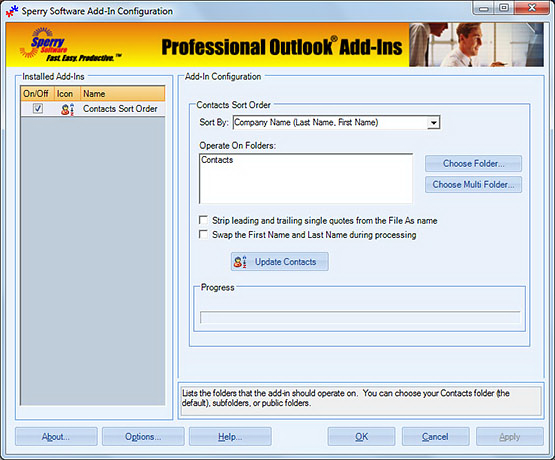
The add-in comes with instructions on how to set up all your new and existing contacts and address books. This is the main window where you convert them all to 'last name, first name' order (or whatever order you want).
Downloads
14-Day Trial Downloads
- Our trial versions are fully functional and are the production version.
- The version you choose below is dependent on whether you have 32-bit or 64-bit Outlook - see How to tell if you have 32-bit or 64-bit Outlook installed for help.
- If you need to uninstall for any reason, review our instructions for uninstalling our add-ins.
- View our End User License Agreement.
Version: 8.1.8918.26894
Last Updated On: 2024-06-01
For Windows 10, 11, Windows Server 2016 or higher;
And Office 365, Outlook 2021, Outlook 2019, and Outlook 2016
Contacts Sort Order for Microsoft 365/Office 365/Outlook 2021/2019/2016 (32-bit)
Contacts Sort Order for Microsoft 365/Office 365/Outlook 2021/2019/2016 (64-bit)
Version 8.0:
Version: 8.0.8831.22100
Last Updated On: 2022-10-10
For Windows 10, 11, Windows Server 2016 or higher;
And Office 365, Outlook 2021, Outlook 2019, and Outlook 2016
Contacts Sort Order for Microsoft 365/Office 365/Outlook 2021/2019/2016 (32-bit)
Contacts Sort Order for Microsoft 365/Office 365/Outlook 2021/2019/2016 (64-bit)
All downloadable add-ins:
View the list of all our downloads (in alphabetical order)
Note: The add-in does not automatically change the order of new entry names in your address book, but it does contain instructions on how to do so. As mentioned above, we have them here for you to reference as well.
Outlook Tip: How to change the order of names in the address book
The Outlook Address Book sometimes displays first and last names in the wrong order. If you want to display "Last, First", but it persists in displaying names as "First Last" (or vice versa) then follow these steps. The steps are dependent on the version of Outlook that you are using and the mode. You can check the version and the mode by going to Help...About.
Outlook 2010, 2013, 2016, 2019 and Office 365: Go to File...Options...People...Set the sort order in the "Names and filing" section
Note: There are free solutions to this problem (we recommend this article from SlipStick.com for example). You may want to check that out first, particularly if you're handy at VBA coding. We make this add-in available for those that are not, or those that need to save time and just get the job done.
There's also more information in the help file, including how to set the default File As order for all new contacts.
Easily find and replace in bulk text in contacts, appointments or tasks with this handy tool. Perfect for updating contacts after an area code split, or companies name changes, or even when a group of tasks must have all their due dates updated.