

Global Search and Replace
Easily find and replace in bulk text in contacts, appointments or tasks with this handy tool. Perfect for updating contacts after an area code split, or companies name changes, or even when a group of tasks must have all their due dates updated.
Do you need to search and replace text in Outlook?
Microsoft® Outlook® has a great search tool. The Advanced Find is powerful and versions of Outlook 2019 (and higher) have very quick searching capabilities. But what happens if you need to do a replace on those items you found? For instance, what happens if the area code gets changed or a company (that several of your contacts belong to) changes its name?
Now you can save time by updating hundreds – even thousands – of items all at once. Easily update all your contacts, tasks and appointments with the Outlook Global Search and Replace add-in. You simply provide the add-in with what you’re looking for, what to replace it with, and which Outlook folders to look in (even all of them). To be more efficient, you can tell it to only search phone numbers, street addresses, date fields, email addresses (in case the company changes domain names), categories, or all fields.
Highlights
- Searches for your text and replaces it
- Updates all your contacts, tasks or appointments in your specified folders, all at once
- Simple, easy to use interface makes finding and replacing a snap
- 2 years of chat, email, and phone support
- 2 years of free upgrades
Features
- Simple, easy to use interface makes finding and replacing a snap
- Prompts you for the folder(s) to search in
- Uses powerful regular expressions for searching, not just simple wildcards (but accepts those as well)
- Updates all your contacts, tasks or appointments in your specified folders at once
- Works with Office 365, Outlook 2021, 2019, 2016 (both 64-bit and 32-bit)
- Integrates directly into Outlook and is invoked from within Outlook
- Works with Microsoft Exchange® Server (and public folders) but does not require it
Updates area codes, zip codes, domain names in your Contacts email addresses, fax numbers, company names, states, abbreviations, and more. Plus, it doesn't just work with contacts, you can update anything in your Outlook tasks or appointments as well. For instance, you can change the due date for a set of tasks, change the location in a set of appointments, etc.
Fast. Easy. Productive. Get your copy today.
*Click on the images to enlarge.
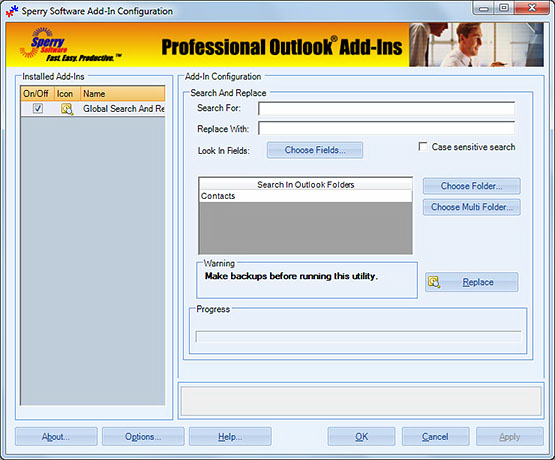
Here you can see the simple, easy to use interface that allows you to specify what to look for, what to replace it with, and where to look. The Look In Fields button is where you further refine the search choosing individual fields, e.g., Business Phone
Downloads
14-Day Trial Downloads
- Our trial versions are fully functional and are the production version.
- The version you choose below is dependent on whether you have 32-bit or 64-bit Outlook - see How to tell if you have 32-bit or 64-bit Outlook installed for help.
- If you need to uninstall for any reason, review our instructions for uninstalling our add-ins.
- View our End User License Agreement.
Version: 8.1.8918.26949
Last Updated On: 2024-06-01
For Windows 10, 11, Windows Server 2016 or higher;
And Office 365, Outlook 2021, Outlook 2019, and Outlook 2016
Global Search And Replace for Microsoft 365/Office 365/Outlook 2021/2019/2016 (32-bit)
Global Search And Replace for Microsoft 365/Office 365/Outlook 2021/2019/2016 (64-bit)
Version 8.0:
Version: 8.0.8831.22100
Last Updated On: 2022-10-10
For Windows 10, 11, Windows Server 2016 or higher;
And Office 365, Outlook 2021, Outlook 2019, and Outlook 2016
Global Search And Replace for Microsoft 365/Office 365/Outlook 2021/2019/2016 (32-bit)
Global Search And Replace for Microsoft 365/Office 365/Outlook 2021/2019/2016 (64-bit)
All downloadable add-ins:
View the list of all our downloads (in alphabetical order)
Outlook already allows you to convert your contacts into vCard format, but only one at a time. But with the Outlook vCard Converter add-in, you can easily import or export all your contacts in vCard format with one click of your mouse.