

Distribution List Manager
Wouldn’t it be great if when you’re reading an email, you could click just one button and have all the email addresses be added to a single distribution list? Well now you can. You can also easily see which groups a given contact belongs to.
The Distribution List Manager add-in for Outlook picks up where Outlook leaves off – providing you with quicker, simpler and more powerful distribution list management functions to keep you concentrating on what you need to do instead of on the tedious chores of maintaining distribution lists. You can read more about the limitations of distribution lists in Outlook.
In addition, you can see at a glance the membership lists of each contact. This Distribution List Manager add-in also shows you which distribution lists the contact belongs to, which means no more guessing which distribution lists the contact is a member of. You can easily add and remove the contact from all your distribution lists. In addition, it will prompt you when you delete the contact, asking you if you’d like to remove the contact from all the distribution lists to which they belong. Nothing could be simpler.
“Your Distribution List Manager works great. I will definitely recommend it to my clients.”
– William J Salas, Sligo Steel
Highlights
- Easily create distribution lists from emails you receive
- See which distribution lists a particular contact belongs to
- Ability to perform backup and restore
- 2 years of chat, email, and phone support
- 2 years of free upgrades
Features
- Create distribution lists from many emails all at once or from a single email with a lot of addresses (or anything in between)
- Works with To, CC (carbon copy), and From recipients when adding distribution list members from emails
- Easily add to existing lists or create a new list each time you add a member
- Shows the current count of members of your distribution lists before you add the new member
- Warns you when you approach or exceed the (customizable) Outlook distribution list limit
- Optionally choose to create distribution lists directly from contacts view, including By Category view
- When you delete a contact, it automatically asks you if you'd like to remove the contact from any distribution lists it's currently on
- Can perform an "Update Now" on all distribution lists that a contact belongs to with one click for easy email address change maintenance
- Provides an info button on your Outlook toolbar that shows the current count of members, when the list was created and when it was last modified
- Makes backups of all your distribution lists with the click of a single button
- Integrates directly into Outlook for easy access
- Works with Office 365, Outlook 2021, 2019, 2016 (both 64-bit and 32-bit)
Fast. Easy. Productive. Add it to your cart by selecting the "Add To Cart" button above.
Note: Depending on what you are trying to accomplish, you may want to check out our other add-in, Send Individually. It allows you to send an email to people one at a time, regardless of whether they are in distribution lists or not.
*Click on the images to enlarge.
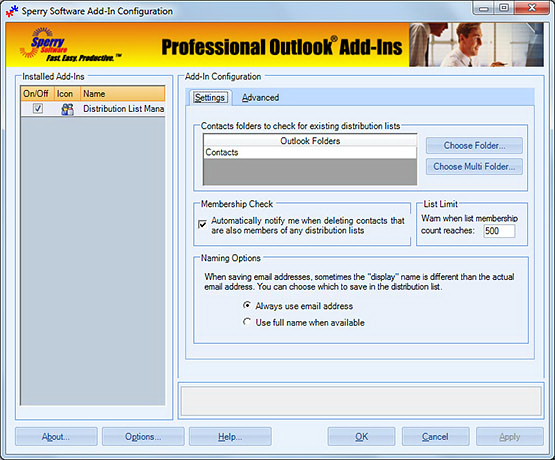
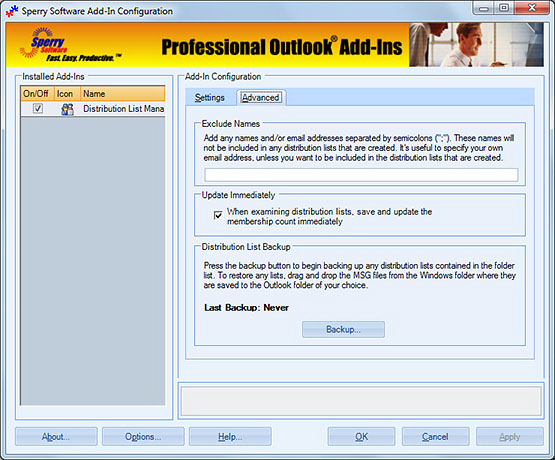
Select from multiple contact folders for examining your distribution lists, not just the default one. You can also see the option that allows you to be notified when deleting a contact that is a member of a distribution list.
Downloads
14-Day Trial Outlook Downloads
- These versions are for classic desktop Outlook and not "new Outlook" - see How to tell if you are using classic desktop or new Outlook.
- Our trial versions are fully functional and are the production version.
- The version you choose below is dependent on whether you have 32-bit or 64-bit Outlook - see How to tell if you have 32-bit or 64-bit Outlook installed for help.
- If you need to uninstall for any reason, review our instructions for uninstalling our add-ins.
- View our End User License Agreement.
Version: 8.2.9687.13503
Last Updated On: 2026-07-10
For Windows 11, Windows Server 2016 or higher;
And Microsoft 365, Outlook 2024, Outlook 2021, Outlook 2019, and Outlook 2016
Distribution List Manager for Microsoft 365/Outlook 2024/2021/2019/2016 (32-bit)
Distribution List Manager for Microsoft 365/Outlook 2024/2021/2019/2016 (64-bit)
Version 8.1:
Version: 8.1.8918.26904
Last Updated On: 2024-06-01
For Windows 10, 11, Windows Server 2016 or higher;
And Office 365, Outlook 2021, Outlook 2019, and Outlook 2016
Distribution List Manager for Microsoft 365/Office 365/Outlook 2021/2019/2016 (32-bit)
Distribution List Manager for Microsoft 365/Office 365/Outlook 2021/2019/2016 (64-bit)
All downloadable add-ins:
View the list of all our downloads (in alphabetical order)
Send out your newsletters, press releases and other announcements to individual recipients. Individually addressing emails allows your email to make it through more spam filters and raises response rates.
Automatically add as contacts people you reply to or send to. Become more organized by setting up the add-in to show you each name it adds or just have it automatically add contacts without any intervention by you.
