

Watch Outlook Folders
Note: This product has been discontinued.
Need to be notified when someone else changes an item in an Outlook shared folder? This add-in will notify you whenever an item in a public folder or mailbox is changed.
Watch Outlook Folders
$19.95
Note: This product has been discontinued.
Need to be notified when someone else changes an item in an Outlook shared folder? This add-in will notify you whenever an item in a public folder or mailbox is changed.
Do you need Outlook notifications when someone changes something in a public folder, shared mailbox, or even your own mailbox? Now you can automatically get notified when an item in a subfolder, public folder or shared mailbox changes. Easily keep track of changes in a multi-user environment, or when using an additional shared mailbox.
Like all our add-ins, Watch Outlook Folders stops working when you close Microsoft Outlook, but “remembers” where it left off when you restart it. The add-in will prompt you (or send an email) for any of the items that have changed. If it’s an excessive number (more than about 10 items) it will ask you if you want to write the notifications to a log file instead so that you can go back and review the changed items later. Nothing could be simpler.
Highlights
- Notifies you when any Microsoft® Outlook® item gets updated without your knowledge
- Notification includes date/time of change and which item it was
- Get notification via email or popup message
- Customizable filter to get notification for specific changes to only certain items
- 2 years of chat, email, and phone support
- 2 years of free upgrades
- Trevor Marsh, Midland Computers
Read more reviews from customers like you
Features
- Integrates directly into Microsoft Outlook
- Easily enable/disable the add-in
- Watch multiple personal folders, public folders, or additional mailboxes at the same time
- Works with Contacts, Tasks, Appointments, Email, or any public folder
- Get notification via email or popup message
- Notification includes date/time of change and which item it was
- Customizable filter to get notification for specific changes to only certain items
- Coded to avoid the Microsoft Outlook security prompts
- Designed to work with Microsoft® Exchange public folders or any other shared folders
- Works with Microsoft Outlook 2016, Outlook 2013, and 2010 (both 64-bit and 32-bit), and Outlook 2007
In addition to receiving the date/time of the last change to an item, and the name of the item itself, if you are using Exchange public folders then the Watch Folders add-in will also tell you who last changed the item.
Add it to your cart by selecting the "Add To Cart" button.
*Click on the images to enlarge.
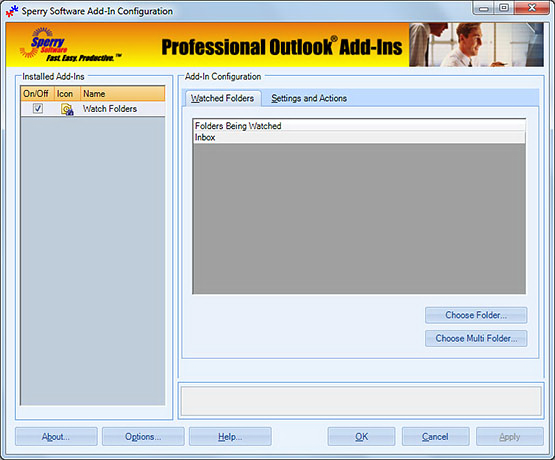
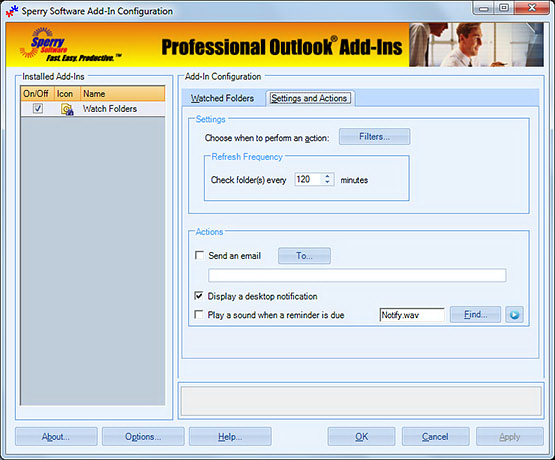
Keep informed of changes to shared public folders with this versatile add-in. Works great with additional mailboxes as well. Buy your copy online and start getting notified in minutes!
Downloads
14-Day Trial Downloads
- Our trial versions are fully functional and are the production version.
- The version you choose below is dependent on whether you have 32-bit or 64-bit Outlook - see How to tell if you have 32-bit or 64-bit Outlook installed for help.
- If you need to uninstall for any reason, review our instructions for uninstalling our add-ins.
- View our End User License Agreement.
For Windows 10, Windows 8 or 8.1, Windows 7, Windows Server 2008 R2 or higher;
And Outlook 2016, Outlook 2013, Outlook 2010, Outlook 2007
Attachment Save Pro for Outlook 2016/2013/2010/2007 (32-bit)
Attachment Save Pro for Outlook 2016/2013/2010 (64-bit)
Version 7.1:
For Windows 10, Windows Server 2012 or higher;
And Office 365, Outlook 2019, Outlook 2016, and Outlook 2013
Attachment Save Pro for Office 365/Outlook 2019/2016/2013/ (32-bit)
Attachment Save Pro for Office 365/Outlook 2019/2016/2013 (64-bit)
All downloadable add-ins:
View the list of all our downloads (in alphabetical order)
"Very easy, and appears to be an excellent solution to the problem of reading e-mail on a VHD monitor."
- Art Buck, CA, United States
Info: Many customers have asked us to specify which filter conditions can be set, rather than being alerted to all changes to a particular public folder. It is important to understand that you can watch whole folders or just subsets of a folder with the built in filters. The built in filters allow you to set different conditions based on the type of item you're watching. For instance, you can set the filters for contacts so that you get notified only if the contact that was changed has a last name of Smith'. The complete list of filters for each type of item is defined below:
Email:
- Notify when the email is from:
- Notify when the email subject contains:
- Notify when the email body contains any of these words or phrases:
- Notify when the last name is:
- Notify when the company name is:
- Notify when the categories contain:
- Notify when the task subject contains:
- Notify when the task body contains any of the words or phrases:
- Notify when the task is assigned to:
- Notify when the subject contains:
- Notify when the appointment body contains any of the words or phrases:
Note that you can set the built in filters only for email, contact, appointment, and task changes, but that you can watch any public, shared folder (and get notified about the changes) regardless of the items it holds. Buy your copy today and start getting the information you need.
The Timed Email Organizer add-in keeps your Inbox neat and tidy by organizing emails using rules. These rules aren’t associated with Outlook rules, and you can even test out your rules before implementing them.
