

Duplicate Email Eliminator
There is nothing more annoying than receiving duplicate emails. Easily remove duplicate emails with this powerful, yet easy to use Outlook add-in.
Do you have Outlook duplicate emails cluttering up your inbox?
There’s nothing more annoying than synchronizing and ending up with duplicate email. Eliminate duplicate email with ease with this powerful Remove Duplicate Emails in Outlook add-in. It saves you time by quickly and easily removing duplicates that occur within your Outlook folders.
How it works:
- Select the folder(s) where the duplicate email messages reside.
- Decide whether to delete them or move them to another folder.
- Begin eliminating duplicates.
That’s it! Nothing could be simpler.
Duplicate email eliminator add-in in PC Magazine “…proved easy to use.”
– M. David Stone, PC Magazine Contributing Editor
Highlights
- Easily remove duplicate emails in Microsoft® Outlook®
- Works with, but does not require Office 365
- Operates on any Outlook email folder
- Powerful algorithm for quick, efficient and thorough scans
- 2 years of chat, email, and phone support
- 2 years of free upgrades
Features
- Allows you to either delete all the duplicates or move them to a folder of your choice
- Works with Exchange public folders or other shared folders (but see Duplicate Posts Eliminator for duplicate posts in Exchange folders)
- Comparisons of two email messages (optionally) based on subject, body, from address, to address, number of attachments, importance, send time and receive time
- You can choose to operate on a single folder or select many folders at once
- Integrates directly into Outlook for easy access
- Works with Office 365, Outlook 2021, 2019, 2016 (both 32-bit and 64-bit)
There are lots of ways to end up with duplicates, but only one reliable way to remove them. Add it to your cart by selecting the "Add To Cart" button above.
*Click on the images to enlarge.
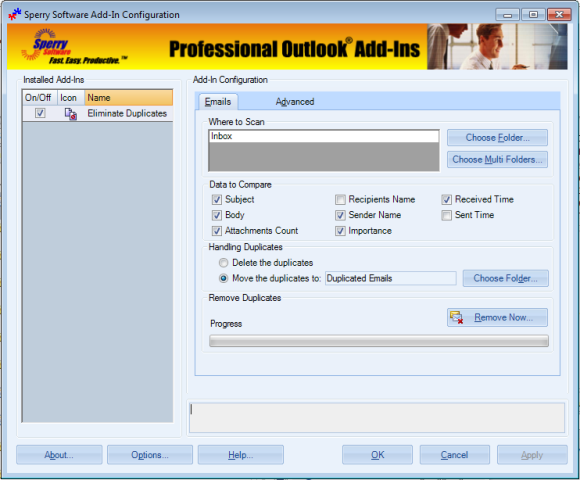
This carefully tested add-in has been proven to take care of even the worst duplication scenarios. It was featured in PC Magazine twice! Add it to your cart today!
Downloads
14-Day Trial Downloads
- The trial version is limited to 100 removals. This limitation goes away after entering your order number.
- Our trial versions are fully functional and are the production version.
- The version you choose below is dependent on whether you have 32-bit or 64-bit Outlook - see How to tell if you have 32-bit or 64-bit Outlook installed for help.
- If you need to uninstall for any reason, review our instructions for uninstalling our add-ins.
- View our End User License Agreement.
Version: 8.0
Last Updated On: 2022-10-11
For Windows 10, 11, Windows Server 2016 or higher;
And Office 365, Outlook 2021, Outlook 2019, and Outlook 2016
Duplicate Email Eliminator for Microsoft 365/Office 365/Outlook 2021/2019/2016 (32-bit)
Duplicate Email Eliminator for Microsoft 365/Office 365/Outlook 2021/2019/2016 (64-bit)
Version 8.0:
Version: 7.1
Last Updated On: 2022-10-11
For Windows 10, 11, Windows Server 2016 or higher;
And Office 365, Outlook 2021, Outlook 2019, and Outlook 2016
Duplicate Email Eliminator for Microsoft 365/Office 365/Outlook 2021/2019/2016 (32-bit)
Duplicate Email Eliminator for Microsoft 365/Office 365/Outlook 2021/2019/2016 (64-bit)
All downloadable add-ins:
View the list of all our downloads (in alphabetical order)
Outlook Tip: Need help preventing future duplicate emails? See How to prevent and remove Outlook duplicates.
Also: Save money with our Eliminator Bundle, which includes all 8 of our duplicate eliminator add-ins for one low price.
This desktop Outlook add-in allows you to remove duplicate appointments. Get rid of those annoying duplicates!
Save money! Are you thinking about getting more than one or two of our duplicate eliminator add-ins? If so, then the Eliminator Bundle is what you need. It includes all 8 of the duplicate eliminator add-ins for a single low price.
Easily remove duplicate Outlook contacts with this add-in. Great for handling duplicates caused by syncing with your phone or other devices.