

Attachment Forget Me Not
This add-in scans each outgoing email and asks you if you meant to attach a file before sending the e-mail, giving you a chance to insert the attachment you forgot.
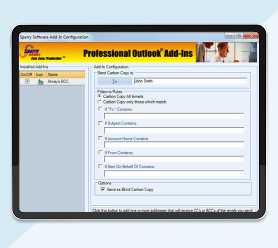
Admit it…if you are like us, you sometimes forget to attach your file(s) to your outgoing emails. Forgetting to attach a file to an email looks stupid and wastes time. Well, now you can have a chance to attach the file before the email goes out!
The Outlook Attachment Forget Me Not add-in scans each outgoing email for phrases like “see attached” or “draft version”. It then asks you if you meant to attach a file before sending the email, giving you a chance to insert the attachment.
Unlike Outlook 2013 (and higher) which has a built in attachment reminder, this add-in allows you to customize the list of words that cue the add-in (for professional jargon and your specific requirements).
Highlights
- Scans emails for clues indicating that an attachment should be there
- Supports many different keywords for different professions
- Works with any outgoing email
- Optionally warns when sending blank subject
- Is aware of attachments in signatures and does the right thing
- 2 years of chat, email, and phone support
- 2 years of free upgrades
Features
- Integrates directly into Microsoft® Outlook® for easy access
- Comes with a built in list of commonly used attachment keywords
- Allows you to add your own keywords for professional jargon (e.g., docket, mortgage application, health record, etc.)
- Works with all email formats - plain text, RTF, or HTML based emails
- Prevents false alarms by paying attention to only the new content in a reply or forward email message
- New! Warns you when you are going to send a blank subject
- Works with Office 365, Outlook 2021, 2019, 2016 (both 32-bit and 64-bit)
New! Are you also forgetting to add a subject to your emails? Now with the ability to detect outgoing email messages with blank subjects, you can greatly reduce the chance that your email will be classified as spam, and also help your recipients to classify your messages quickly.
Be sure that each email that you send has the attachments it needs. Add it to your cart by selecting the "Add To Cart" button.
*Click on the images to enlarge.
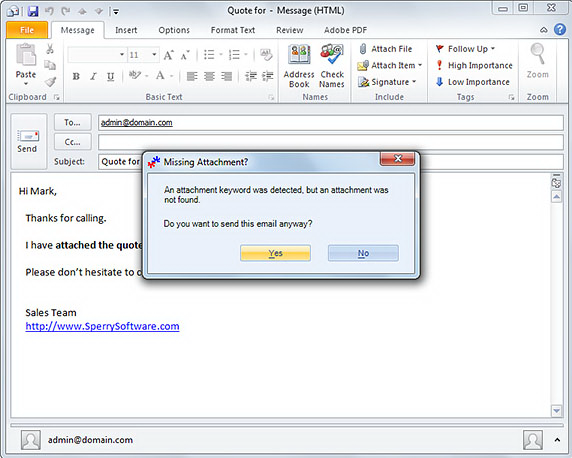
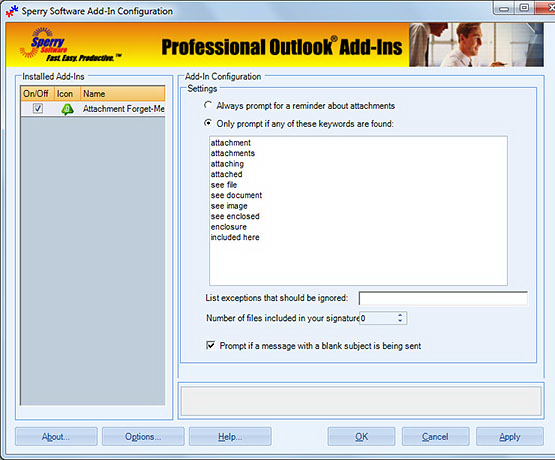
You can customize which words you use most frequently. Any of the words plugged in here will automatically cause the add-in to scan the email for an attachment and if one isn't found, you get a chance to add it. It's that simple.
Downloads
14-Day Trial Outlook Downloads
- These versions are for classic desktop Outlook and not "new Outlook" - see How to tell if you are using classic desktop or new Outlook.
- Our trial versions are fully functional and are the production version.
- The version you choose below is dependent on whether you have 32-bit or 64-bit Outlook - see How to tell if you have 32-bit or 64-bit Outlook installed for help.
- If you need to uninstall for any reason, review our instructions for uninstalling our add-ins.
- View our End User License Agreement.
Version: 8.2.9687.13478
Last Updated On: 2026-07-10
For Windows 11, Windows Server 2016 or higher;
And Microsoft 365, Outlook 2024, Outlook 2021, Outlook 2019, and Outlook 2016
Attachment Forget-Me-Not for Microsoft 365/Outlook 2024/2021/2019/2016 (32-bit)
Attachment Forget-Me-Not for Microsoft 365/Outlook 2024/2021/2019/2016 (64-bit)
Version 8.1:
Version: 8.1.8918.26833
Last Updated On: 2024-06-01
For Windows 10, 11, Windows Server 2016 or higher;
And Office 365, Outlook 2021, Outlook 2019, and Outlook 2016
Attachment Forget-Me-Not for Microsoft 365/Office 365/Outlook 2021/2019/2016 (32-bit)
Attachment Forget-Me-Not for Microsoft 365/Office 365/Outlook 2021/2019/2016 (64-bit)
All downloadable add-ins:
View the list of all our downloads (in alphabetical order)
Prevent mistakes when sending – this add-in prompts when you send email outside your company, if the email contains certain words or patterns, or even if the attachments violate your conditions. It checks outgoing emails for over 12 different safeguards. Perfect for legal firms, or defense firms with sensitive communications.
The Timed Email Organizer add-in keeps your Inbox neat and tidy by organizing emails using rules. These rules aren’t associated with Outlook rules, and you can even test out your rules before implementing them.
