
Q. What's the difference between Outlook and Outlook Express?
Q. I know that the add-ins are for Outlook 2003, 2002 or 2000. How do I tell which
version of Outlook I have?
Q. How will I get my add-ins once I buy them from you? Can I download them?
Q. How do I add items to my cart?
Q. How do I delete items from my cart?
Q. How do I check out?
Q. How big are the downloads?
Q. Do you have trial versions?
Q. How do I install the add-ins?
Q. How do I uninstall the add-ins?
Q. I installed the add-in, but I can't find it?
Q. When I install the add-in I get a request to insert the disk?
Q. Do the add-ins work with Exchange Public Folders?
Q. I get the message "A program is trying to access e-mail addresses you have stored
in Outlook. Do you want to allow this? If this is unexpected, it may be a virus and you
should choose "No". What is that?
Q. I am purchasing multiple licenses. Can I get a site license or volume discount?
Q. Do you offer Affiliate Programs or a Reseller's License?
Q. I have an idea or a need for an add-in?
|
|
Q. What's the difference between Outlook and Outlook Express?
|
Microsoft Outlook Express is an email program that comes with Internet Explorer
and as such is free. It is intended as a basic email client, and Microsoft limits
programmer's capabilities to modify the program. Nonetheless, it is a stable product and
millions of people use it everyday.
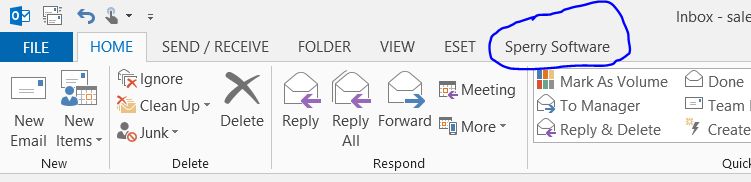
Microsoft Office Outlook is a full fledged email client. It is part of the Microsoft
Office suite. Microsoft goes to great lengths to make it easy for programmers to modify
and extend Outlook through a technique called "add-ins". These add-ins are available
for Outlook 2000, Outlook 2002, or Outlook 2003.
Back to top
|
|
|
Q. I know that the add-ins are for Outlook 2000, Outlook 2002 or Outlook 2003. How do I tell which version of
Outlook I have?
|
Go to Help...About. This will tell you if you have Outlook Express or Outlook as well as the
exact version number, which is frequently required for technical help. If it says Outlook
98 or Outlook 97 then the add-ins will fail to install.
Back to top
|
|
|
Q. How will I get my add-ins once I buy them from you? Can I download them?
|
It works like this:
- You choose the add-ins you like and add them to your cart.
- Click 'Checkout' and provide your credit card information and email address, then
click 'Submit'.
- You receive an email a few minutes later describing where to download the add-ins
along with the passwords.
Therefore, be sure to provide a valid email address when you order.
Back to top
|
|
|
Q. How do I add items to my cart?
|
To add an item to your cart all you have to do is go to the home page,
then click on the add-in that you want. When the add-in page opens up, select the quantity
that you want and press "Add To Cart". This will return you to the home page to continue
browsing or to check out. Be sure that you've enabled Javascript in your browser.
Back to top
|
|
|
Q. How do I delete an item from my cart?
|
You can delete an item from your cart when you checkout by setting the quantity to 0 and
clicking the "Update" button. This will refresh your view and the correct names and amounts of add-ins will
be displayed.
Back to top
|
|
|
Q. How do I check out?
|
To start the check out process just click the "Check Out" button located in your cart
just below the menu on the left side of every page. This will bring you to a page to input some more
information so we can finish the check out process.
Back to top
|
|
|
Q. How big are the downloads?
|
Most of them are 1 Meg or less in size. See the individual web pages for the exact size.
Back to top
|
|
|
Q. Do you have trial versions?
|
Not at this time. We have found from past experience
that the number of tech support questions greatly exceeds our capacity to answer
them, and so we've decided to reserve our support resources for paying customers.
Back to top
|
|
|
Q. How do I install the add-ins?
|
To install an add-in simply double click on the add-in's MSI file and follow
the step by step instructions. The next time you run Outlook, the add-in will ask you for the user
name and registration keys and will continue to do so until you provide them. Provide it using the
information you received from the order email. If you have further questions, at the end of the
setup, a ReadMe.txt file will appear guiding you further for your particular add-in.
Back to top
|
|
|
Q. How do I uninstall the add-ins?
|
To uninstall an add-in, go to Start...Control Panel...Add/Remove Programs. Look for the add-in and select "Remove".
If you happen to have the MSI file, you can also click on it again and it will ask you if you want to repair the current installation or remove it.
Back to top
|
|
|
Q. I installed the add-in, but I can't find it?
|
Because the add-ins are integrated into Outlook, and become part of Outlook, they can be found in Outlook. Just go to Tools...Options...(name of add-in). It will be there alongside
If you happen to have the MSI file, you can also click on it again and it will ask you if you want to repair the current installation or remove it.
Back to top
|
|
|
Q. When I install the add-in I get a request to insert the disk?
|
This error used to occur with our old setup files (.zip files). You might want to look into getting a newer copy of the add-ins by contacting us.
In the meantime, it is necessary to completely extract the files to a temporary folder first, because you cannot run setup.exe from within Winzip itself.
Back to top
|
|
| Q. |
Do the add-ins work with Exchange Public Folders?
|
|
Yes.
|
|
|
Q. I get the message "A program is trying to access e-mail addresses you have stored
in Outlook. Do you want to allow this? If this is unexpected, it may be a virus and you
should choose "No". What is that?
|
Some of the add-ins produce this message, which is caused by the Outlook Security
Update provided by Microsoft for Outlook 2000, or if you have Outlook 2002 or Outlook 2003, it's built in.
Some of the add-ins that cause this message are the duplicate eliminator series. They do
this because they are intended to be run infrequently; i.e., once you run them, there's usually
no reason to run them again or if you do, only occasionally. It is planned to program the
duplicate eliminator series to not cause the security prompts.
In the meantime, if you are running one of these add-ins, then it is permissible to
click "yes" to allow the program to continue.
You can tell which add-ins are programmed to avoid the Outlook security prompt by looking
at the descriptions. Near the bottom it will say something like "This add-in has been coded
to avoid the Outlook Security prompt".
Back to top
|
|
|
Q. I am purchasing multiple licenses. Can I get a site license or a volume discount?
|
Yes, significant volume discounts are available when purchasing more than 10 licenses. Please
contact us directly at 1 (904) 343-7408 or email sales@SperrySoftware.com.
Back to top
|
|
|
Q. Do you offer Affiliate Programs or a Reseller's License?
|
Yes, see our affiliates page for more information on reselling.
Back to top
|
|
|
Q. I have an idea or a need for an add-in?
|
This is really two separate questions.
If you have an idea for an add-in, we'd love to hear about it.
We keep track of all requests and when we get enough of a particular kind, we turn it into
a full fledged add-in.
If you have a need for a custom built add-in, we can help you. A free estimate for time and
cost is produced for every inquiry, all you need to do is contact us
and we'll talk about the requirements for your situation. Note: It takes about two months to
produce an add-in, depending on the complexity, if it's a custom version of a current add-in,
or a completely new one.
Back to top
|