Do you need a customization of one of our add-ins, or even a completely new add-in? If so, you’ve arrived at the right place because Sperry Software offers custom versions of our Outlook add-ins.
Most of the time, but not always, a large majority of our customizations like this are for firms in the legal, defense, and banking industries. These firms usually have a lot at stake, either financially or regulatory. Many of our most popular modifications to Outlook add-ins come from the ideas generated by these firms.
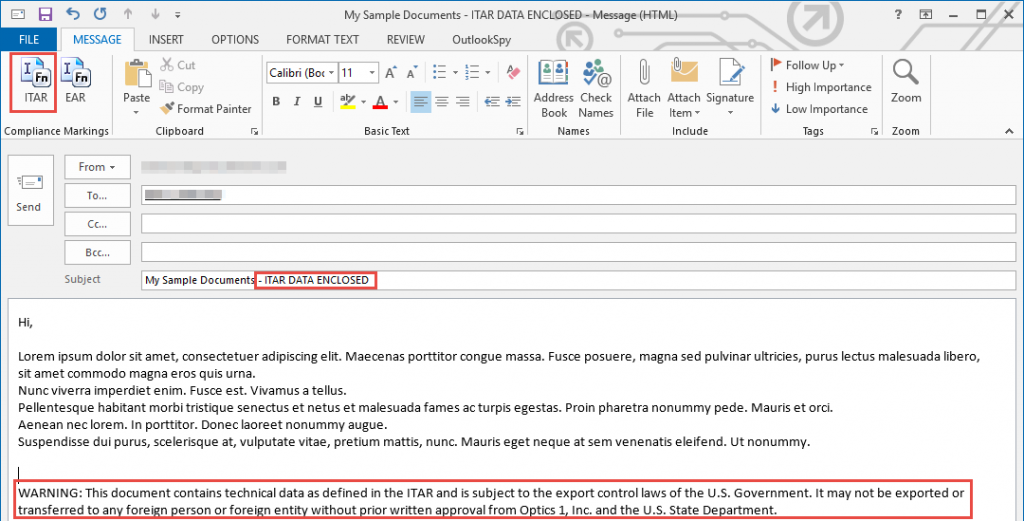
A mid size defense firm needed a way to quickly allow their employees to mark an email subject AND body when either ITAR data (International Traffic in Arms Regulation data) or EAR data (Export Administration Regulation data) was included. Sperry Software added a new feature to Quick Text Hotkeys to allow it to place two new buttons on the Outlook toolbar. The buttons have been designed to easily insert the applicable warning after the subject and again in the body of the email, after any new text the user typed but before the next email header . This makes it super simple for the employees to mark which emails have confidential information:
Highlighted is the ITAR button, the subject after clicking the ITAR button, and the text inserted into the body after clicking the ITAR button.
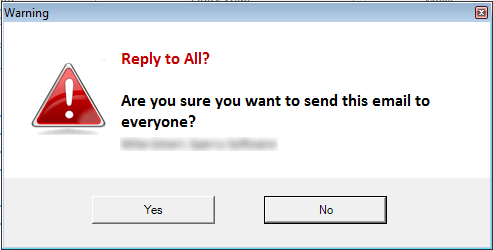
Many customers ask for a customized version of this add-in. One in particular, a large international banking company, asked that instead of a standard Windows prompt be shown when the reply to all button was clicked that more alarming and in-your-face type prompt be developed and displayed:
The font and colors were changed to match the corporate style.
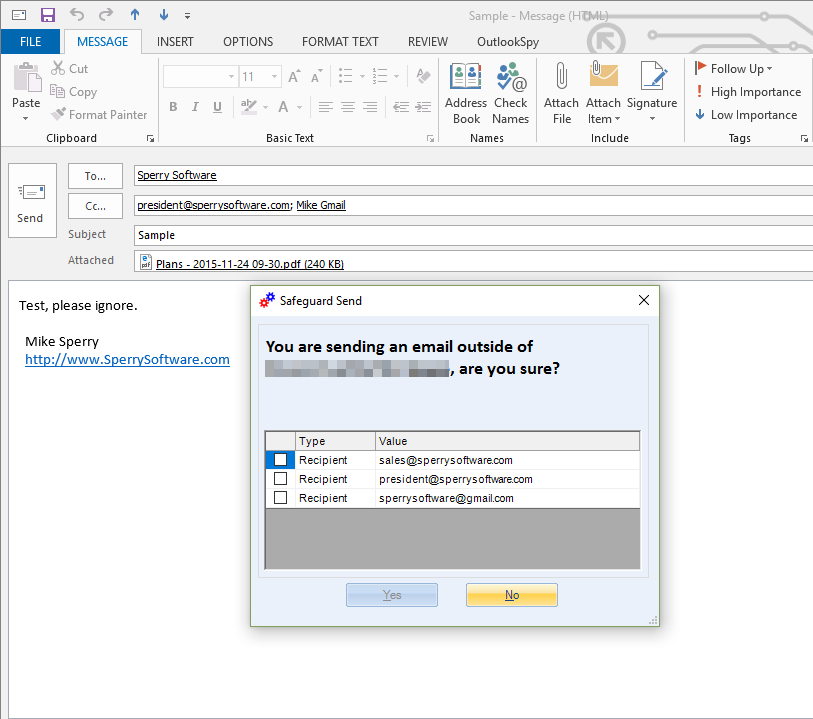
This add-in is popular in the defense/military industry and other sectors where sensitive information is exchanged. A global banking fortune 500 based in the UK requested a change whereby rather than showing a Windows prompt, a grid with checkboxes be displayed. Each recipient’s email address is next to the checkbox. All checkboxes must be checked in order to enable the “Yes” button:
For this customer, the “Yes” button will not become enabled until all three recipients are acknowledged with a checkbox.
Another firm had a request for a feature similar to this one except that they wanted the warning prompt from Reply To All Monitor (above) and list the email addresses, one per line. But, if the number of recipients caused the vertical scrollbar to appear, then the user had to scroll all the way down before the “Yes” button would be enabled. This feature can be compared to forcing users to scroll to the end of a typical software EULA before allowing the software to be installed.
Creating New Custom Outlook Add-Ins
All of the above add-ins are available as retail products (although as seen not all features are always exposed). However, Sperry Software has created more custom add-ins that are not yet available in the retail section. They will be added at some point in the future, but in the meantime they are mentioned here so that an idea of what is possible can be understood:
Email Quota Alerts
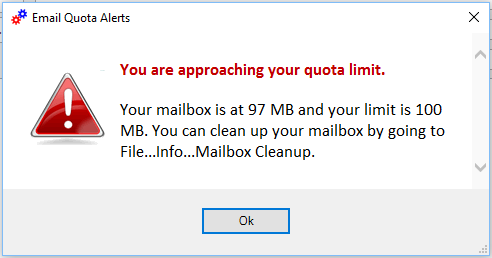
A large law firm in New York had a problem with emails that weren’t going out after a partner had hit send on a sensitive and critical email and then walked away from his desk. When he returned the next day, he discovered that the email had not been sent because unbeknownst to the partner, his email quota had been exceeded and Outlook prevented email from going out until his mailbox size was reduced. Sperry Software created an add-in that displays a clear warning when the quota threshold is being approached, and another more stern warning when the quota threshold has been exceeded:
This is a sample warning prompt, the actual exceeded quota prompt looks similar but has different text.
Approval Workflows
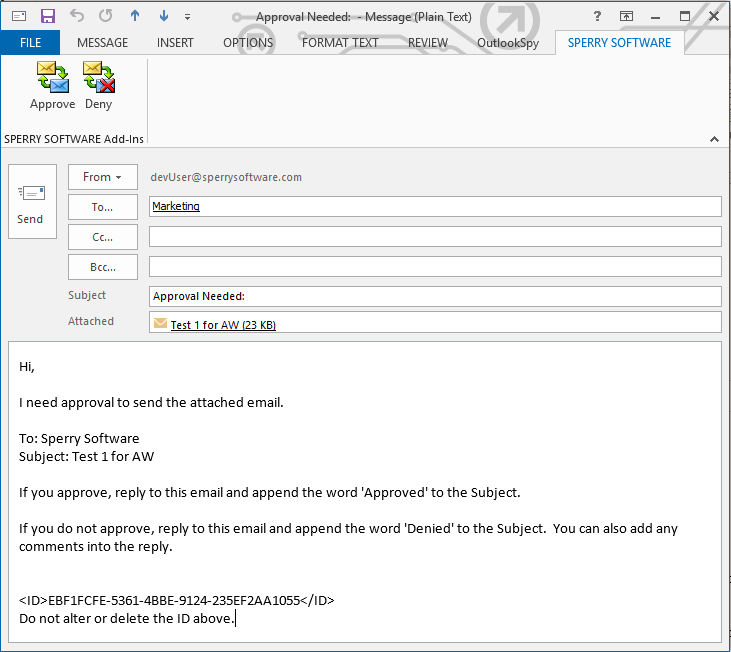
A large international bank processing office with multiple large banks as clients had a need to ensure that sensitive emails were checked by multiple personnel before being allowed to be sent out. Sperry Software developed an add-in that went into action the moment the send button was clicked – the email did not go out like normal, but rather went to a “reviewers queue” where a manager could approve or reject the email. If it was approved it went out like normal, but from the original sender’s mailbox not the manager’s. If it was rejected, the manager could explain why in the reply and the original email went to a subfolder of the inbox. This add-in is akin to the concept of dual signing checks in a corporate environment – two sets of eyes look at the email before it goes out the door, ensuring accuracy:
This is the email that the reviewer receives. The original email to be reviewed is in the attachment (Test 1 for AW).
Phishing Net
An international pharmaceutical firm needed a simple method by which phishing email scams could be easily reported to their corporate security officer. Sperry Software created a new add-in that placed a toolbar button on their Outlook ribbon which when pressed attached the currently selected email to a predefined email addressed to the corporate security team. The suspected phishing email was removed from the users view (but not deleted, in case it was determined that it was indeed a valid email). Here’s what the Outlook toolbar looks like with it installed:
This is the button the user selects after viewing an email that looks suspicious.
Get Started With Our Custom Enterprise Solutions
In addition to customizing the add-in itself, Sperry Software also customizes the installation package to make it easier on your system administrators. This is a free service for a volume purchase of at least 100 licenses ($300 otherwise), as is tech support for the first year. On the anniversary of your purchase you will receive an invoice for 20% of the sale, for the upcoming years’ worth of upgrades and technical support.
Would you like to get started? Simply fill out this information and we will get back to you with a quote and questionnaire. The questionnaire is used to find out what you want out of the add-in, whether the user interface should be visible or not, etc. Once you decide to move forward, we get started on creating your custom Outlook add-in, delivered as a system administrator friendly MSI package. At that time, we will also supply you with documentation on how to centrally administer the add-in and make changes to it after it has been deployed.