

VCard Converter
Outlook already allows you to convert your contacts into vCard format, but only one at a time. But with the Outlook vCard Converter add-in, you can easily import or export all your contacts in vCard format with one click of your mouse.
How do you know if you need a vCard converter? Outlook already allows you to convert your contacts into vCard format (a vcf file). However, you can only convert one contact at a time. Plus, Outlook can only read the first entry of a vcard file no matter how many contacts are contained in that file.
Now however, you can easily convert all your contacts to vCard format with one click of your mouse with the Outlook vCard Converter add-in. It allows you to export all your contacts within a folder, or you can choose to export just the ones you select. In addition, you can import multiple contacts from a single vcf file.
“Just thought I’d let you know that I purchased the program and it worked very well. Thanks for saving me so much time!!!”
– Jeff Kopelson
Highlights
- Import vcards to create Microsoft® Outlook® contacts
- Export Outlook contacts to vcards (vcf files)
- Transfer contacts between MACs, iPhones, and more
- New! Now contact photos can be imported and exported
- Exports multiple contacts to a single vcard file or individual vcard (vcf) files
- Easy to setup and run - right from within Outlook
- 2 years of chat, email, and phone support
- 2 years of free upgrades
Features
- Integrates directly into Outlook for easy access
- Imports multiple contacts contained in a single .vcf file
- Directly import contacts to any Outlook folder, not just your default Contacts folder
- Optionally merge existing contacts with those being imported
- Exports multiple contacts to a single .vcf file or individual vcf files
- Import and export includes your contact's pictures (if any)
- Handy toolbar button for frequent exporting - just highlight the contacts and click the button
- Choose any contact folder to import/export, including those on Microsoft® Exchange public folders
- Support for underlying technology means faster imports and exports than previous versions
- Works with Office 365, Outlook 2021, 2019, 2016 (both 64-bit and 32-bit)
*Click on the images to enlarge.
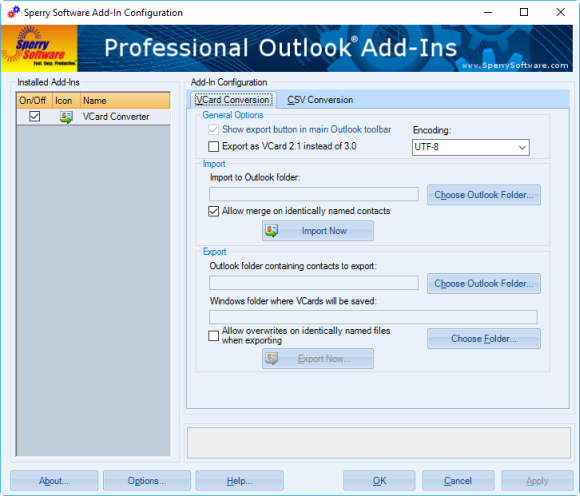
The add-in imports and exports vcards for Outlook, contained in one VCF file or many (i.e., one VCF file per contact). It now supports the Vcard 3.0 specifications.
"VCard Converter was a Godsend. All my contacts were in Outlook and BestBuy could not get them off my old iPhone onto the new one. I moved them as a .vcf but then couldn't get them back onto a new computer's Outlook. Thanks!"
- Bob Malone
Downloads
14-Day Trial Outlook Downloads\r
- \r
\t
- These versions are for classic desktop Outlook and not "new Outlook" - see How to tell if you are using classic desktop or new Outlook. \r \t
- Our trial versions are fully functional and are the production version. \r \t
- The version you choose below is dependent on whether you have 32-bit or 64-bit Outlook - see How to tell if you have 32-bit or 64-bit Outlook installed for help. \r \t
- If you need to uninstall for any reason, review our instructions for uninstalling our add-ins. \r \t
- View our End User License Agreement. \r
\r Version: 8.2.9687.13571
Last Updated On: 2026-07-10
\r For Windows 11, Windows Server 2016 or higher;
\r And Microsoft 365, Outlook 2024, Outlook 2021, Outlook 2019, and Outlook 2016
\r Vcard Converter for Microsoft 365/Outlook 2024/2021/2019/2016 (32-bit)
\r Vcard Converter for Microsoft 365/Outlook 2024/2021/2019/2016 (64-bit)\r
\r \r Version 8.1:
\r Version: 8.1.8918.28751
Last Updated On: 2024-06-01
\r For Windows 10, 11, Windows Server 2016 or higher;
\r And Office 365, Outlook 2021, Outlook 2019, and Outlook 2016
\r Vcard Converter for Microsoft 365/Office 365/Outlook 2021/2019/2016 (32-bit)
\r Vcard Converter for Microsoft 365/Office 365/Outlook 2021/2019/2016 (64-bit) \r
\r All downloadable add-ins:\r
\r \r View the list of all our downloads (in alphabetical order)
More Information
You can read this article if you want to learn more about Outlook's built-in ability to handle VCards.
Moving to a Mac?
Vcard Converter provides a great way to move your contacts from Outlook to the Mac for use in the default mail program or Entourage. Note: This product runs only under Windows.
New! As of version 4.1, we've added direct support for the VCard 3.0 specifications (rfc 2425 and rfc 2426). What this means for you is that you get faster, more complete transfers of your contacts. For instance, Outlook doesn't support some VCard fields (like Categories) because it only supports VCard specification 2.1 - but VCard Converter handles them without a problem. After using this tool, you may find that there are new contact fields that are filled in that you didn't know were contained in your VCard files (like Categories, for example).
This new direct support for the VCard specifications is also quick. Because the add-in creates the contact directly and fills in the fields by rapidly reading the file rather than relying on Outlook's native capabilities, it means the import and export process is now faster than ever before. It's perfect for converting to and from Apple products.
Read More From Our Blog:
Easily find and replace in bulk text in contacts, appointments or tasks with this handy tool. Perfect for updating contacts after an area code split, or companies name changes, or even when a group of tasks must have all their due dates updated.
The Timed Email Organizer add-in keeps your Inbox neat and tidy by organizing emails using rules. These rules aren’t associated with Outlook rules, and you can even test out your rules before implementing them.
Automatically add as contacts people you reply to or send to. Become more organized by setting up the add-in to show you each name it adds or just have it automatically add contacts without any intervention by you.
