

Secure Email Forward
Note: This product has been discontinued.
Does your IT department have strict rules against forwarding content outside your network? With Secure Email Forward, only limited parts of an email get forwarded to an email address that you specify.
Secure Email Forward
$17.95
Note: This product has been discontinued.
Does your IT department have strict rules against forwarding content outside your network? With Secure Email Forward, only limited parts of an email get forwarded to an email address that you specify.
Security is at an all time high for everyone and your email is no exception. Stay secure by keeping the content of your email messages within the boundaries of your systems. With Secure Email Forward, only limited parts of an email get forwarded to an email address.
You simply designate the email to forward to, then which parts you want forwarded (choosing from subject, ‘from’ address, even the body of the email) and then set which folder the add-in should monitor (for example your Inbox). The next time an email comes in, it will be forwarded to the email address you designated.
Because the add-in will watch any Microsoft® Outlook® folder (not just your Inbox), it can be combined with the Outlook Rules Wizard to become an extra powerful utility. Add it to your cart by selecting the “Add To Cart” button.
Highlights
- Forwards only limited parts of an email message
- Choose which parts to forward, for instance just the subject
- Filter which email messages are to be forwarded, or forward all of them
- Customize the body of each email forwarded with your own text
- 2 years of chat, email, and phone support
- 2 years of free upgrades
Features
- Easily enable/disable the add-in - just turn it on, and the email messages that you specify will be forwarded
- Customize which email messages are to be forwarded, or forward all of them
- Choose to automatically scan your Inbox or any other Outlook folder
- Send to one or to many recipients
- Forward the Received Date, Subject, From Address, or even the body of the email (ignoring attachments)
- Customize the body of each email forwarded with your own text
- Integrates directly into Outlook
- Works with Microsoft Outlook 2016, 2013 and 2010 (both 64-bit and 32-bit), and Outlook 2007
Note: If you like this add-in, you might also be interested in Mobile Email Redirect, which will forward emails to your phone or pager but when you reply, the replies go back to the original sender.
Don't forget, Secure Email Forward is perfect for phones and pagers with limited messaging capabilities because it can automatically prevents attachments from being forwarded (unlike the standard Outlook forward mechanism). Buy your copy today!
*Click on the images to enlarge.
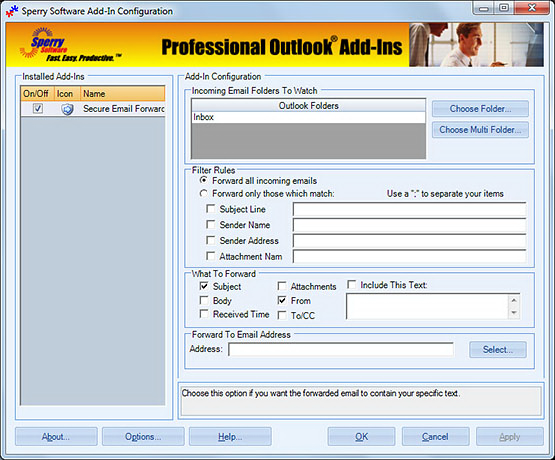
You can see from the screenshot where you decide which parts of the email get forwarded and where to send it.
Downloads
14-Day Trial Downloads
- Our trial versions are fully functional and are the production version.
- The version you choose below is dependent on whether you have 32-bit or 64-bit Outlook - see How to tell if you have 32-bit or 64-bit Outlook installed for help.
- If you need to uninstall for any reason, review our instructions for uninstalling our add-ins.
- View our End User License Agreement.
For Windows 10, Windows 8 or 8.1, Windows 7, Windows Server 2008 R2 or higher;
And Outlook 2016, Outlook 2013, Outlook 2010, Outlook 2007
Attachment Save Pro for Outlook 2016/2013/2010/2007 (32-bit)
Attachment Save Pro for Outlook 2016/2013/2010 (64-bit)
Version 7.1:
For Windows 10, Windows Server 2012 or higher;
And Office 365, Outlook 2019, Outlook 2016, and Outlook 2013
Attachment Save Pro for Office 365/Outlook 2019/2016/2013/ (32-bit)
Attachment Save Pro for Office 365/Outlook 2019/2016/2013 (64-bit)
All downloadable add-ins:
View the list of all our downloads (in alphabetical order)
"Very easy, and appears to be an excellent solution to the problem of reading e-mail on a VHD monitor."
- Art Buck, CA, United States
The Timed Email Organizer add-in keeps your Inbox neat and tidy by organizing emails using rules. These rules aren’t associated with Outlook rules, and you can even test out your rules before implementing them.