

Add Ins
Save more money! Select any three of the add-ins below for just $145.95 and they will be added to your cart as a single bundle.
Save money! Select any seven of the add-ins below for just $295.95 and they will be added to your cart as a single bundle.
Automatically add as contacts people you reply to or send to. Become more organized by setting up the add-in to show you each name it adds or just have it automatically add contacts without any intervention by you.
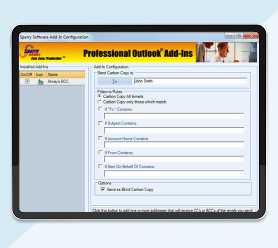
Does your assistant or your boss need to be copied on email? This add-in will perform either a BCC (blind carbon copy) or a CC (carbon copy) automatically, every time you email. Easily create a record of important emails automatically.
This add-in scans each outgoing email and asks you if you meant to attach a file before sending the e-mail, giving you a chance to insert the attachment you forgot.
Save space in your inbox! Keep your email in Outlook and your attachments in a separate Windows folder with this powerful Save Emails and Attachments add-in. It automatically replaces attachments with a link to the file.
Similar to our standard Attachment Save add-in, this add-in will automatically save emails and/or attachments using rules. It will save to different Windows folder locations based on the subject, or who it’s from, etc. Completely versatile with an unlimited number of rules!
Finally, an add-in that automatically prints email when it arrives at your Inbox without you having to do anything. Save time by automating those repetitive chores.
Similar to our standard Auto Print add-in, this add-in will automatically print emails and/or attachments using rules. It will even print to different printers based on the subject, or who it’s from, etc. Completely versatile with an unlimited number of rules!
Prevent mistakes when using tab to select email addresses in the To field by clearing out your autocomplete list on a regular basis. This add-in will do just that – every time you start Outlook it will clean out the “To” field drop down list.
Do you need to BCC or CC to multiple different people? This add-in is similar to our Always BCC add-in except that it supports multiple BCC rules for multiple different people. It even provides for exceptions to the rules!
Stay organized by updating all your contacts and address books with either ‘last name, first name’ order or ‘first name, last name’ order. This add-in automates what is otherwise a tedious, error prone process and is free.