

Timed Email Organizer
The Timed Email Organizer add-in keeps your Inbox neat and tidy by organizing emails using rules. These rules aren’t associated with Outlook rules, and you can even test out your rules before implementing them.
According to a study by The Radicati Group, the average number of emails sent and received by business workers is 100.5 and that number is expected to grow. How will you manage that tide of information? You need an Outlook mail organizer tool to help you with routing, categorizing and taking care of stale emails.
The Outlook Timed Email Organizer add-in keeps your inbox neat and tidy by automatically organizing emails based on who it’s from, subject, how old it is (among many other conditions).
The email sorting software mimics some of the most popular Outlook rule functionality. For instance, you can run rules on emails that:
- Have certain subjects, or certain words in the body
- Are sent to, or received from your specified recipients
- Which have an attachment
However unlike Outlook rules, you can also run rules on emails that:
- Have attachments with certain names or file extensions
- Are older than a specified number of minutes, hours, days or months
- Have been read, or are still unread
- Have been replied to, or have not been replied to
- Have been modified or changed recently
What can you do with the emails once you’ve identified them? Here at Sperry Software, we’ve done research to find out the most common types of actions. With this Outlook Timed Email Organizer add-in, you can:
- Move the email to a particular folder
- Copy the email to a particular folder or folders
- Delete the email
- Permanently delete the email
- Forward the email
- Forward the email as an attachment
- Reply to the email
- Give the email a specified category
- Clear all categories
- Mark the email as read or unread
- Set the importance of the email to low or high
As you can imagine, combining the conditions for this email organizer software gives you a powerful mechanism for staying organized.
For example, you can create rules like this:
- Automatically move the email after it has been read – perfect for being able to easily read emails on a phone
- Move all emails from a particular company into a specified folder
- Move any emails that are over one day old and replied to
- Raise the priority of any emails that have not been responded to in over two hours
- Automatically delete emails from Groupon, Facebook and the like after two weeks
It’s easy to see how this Outlook Timed Email Organizer add-in can be a weapon against the deluge of emails that arrive in your inbox.
Note that unlike our Power Rules Manager this add-in does not use Outlook rules, it is its own rules engine. You can compare the features of the two add-ins.
Highlights
- Automatically keeps your Inbox organized
- Operate rules on any folder, not just the Inbox
- Automatically get rid of clutter - old emails, newsletters, and other junk
- New! Detect missing emails
- Enforce timely responses by you or when using a shared mailbox
- Can be used as an autoresponder
- Runs its own independent "rules engine" and so is not subject to the Outlook rules limit
- Supports unique rule conditions (and actions!) for more flexibility than Outlook provides
- Works on emails as they age, or immediately (as soon as it's sent or received)
- 2 years of chat, email, and phone support
- 2 years of free upgrades
Features
- Powerful rules engine to process emails quickly and efficiently
- Supports wildcards in most rules
- Supports AND, OR and NOT in the subject, body, and attachment name conditions
- Works in your Inbox, Sent Items, or any other folder you specify
- Works on emails that are days old, hours old, or even minutes old
- Also adds two toolbar buttons: Close and File and Send and File - both are completely independent of any other rules
- Includes an option to generate a report of what actions were taken on given emails
- Catch up quickly: Batch process can go through all your rules all at once, immediately
- Shows when the rule was created, and the last time it was used
- A Test function! This lets you preview the list of emails before taking action for a given set of rules
- Can work in conjunction with your current Outlook rules and even imports your selected Outlook rules
- Runs automatically in the background even if Outlook is closed
- Easily backup and restore your existing rules
- Works with Office 365, Outlook 2021, 2019, 2016 (both 64-bit and 32-bit)
"Easy to buy and install. Does what I wanted. Still looking at different ways of using it!"
- Terry Ashton, Aberdeenshire, UK
*Click on the images to enlarge.
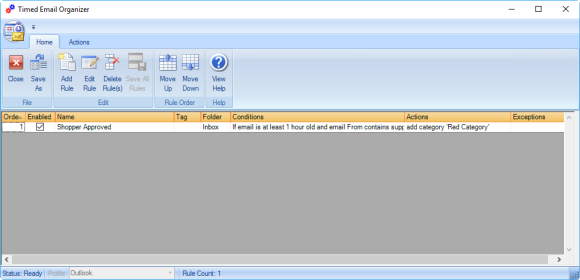
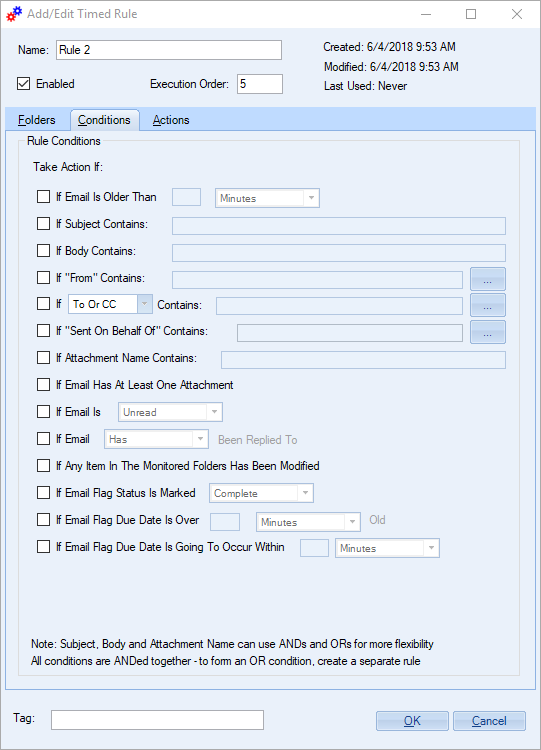
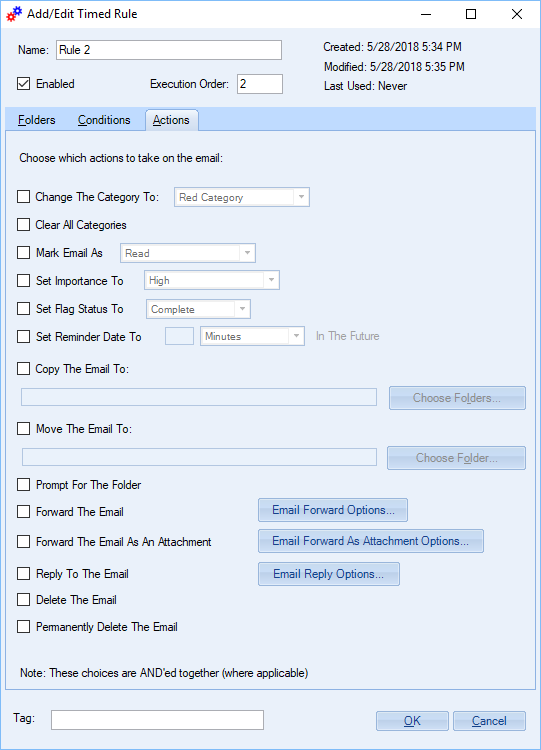
Here you can see the main grid with several rules, and a close up of the conditions and of the actions available to each rule.
Downloads
14-Day Trial Outlook Downloads
-
- These versions are for classic desktop Outlook and not "new Outlook" - see How to tell if you are using classic desktop or new Outlook.
-
- Our trial versions are fully functional and are the production version.
-
- The version you choose below is dependent on whether you have 32-bit or 64-bit Outlook - see How to tell if you have 32-bit or 64-bit Outlook installed for help.
-
- If you need to uninstall for any reason, review our instructions for uninstalling our add-ins.
-
- View our End User License Agreement.
Version: 8.2.9729.22905
Last Updated On: 2026-08-21
For Windows 11, Windows Server 2016 or higher;
And Microsoft 365, Outlook 2024, Outlook 2021, Outlook 2019, and Outlook 2016
Timed Email Organizer for Microsoft 365/Outlook 2024/2021/2019/2016 (32-bit)
Timed Email Organizer for Microsoft 365/Outlook 2024/2021/2019/2016 (64-bit)
Version 8.1:
Version: 8.1.9025.32801
Last Updated On: 2024-09-16
For Windows 10, 11, Windows Server 2016 or higher;
And Office 365, Outlook 2021, Outlook 2019, and Outlook 2016
Timed Email Organizer for Microsoft 365/Office 365/Outlook 2021/2019/2016 (32-bit)
Timed Email Organizer for Microsoft 365/Office 365/Outlook 2021/2019/2016 (64-bit)
All downloadable add-ins:
View the list of all our downloads (in alphabetical order)
More Information
The facility to test a rule means that you can set up a rule and then run it to see what emails would be affected. This allows you to hone your rule to include the exact conditions that you want without affecting any emails until you're ready.
It can also import your current Outlook rules if you're running out of rule space.
Note that Outlook must be up & running in order to have the rules process your email.
Read More from Our Blog:
- Announcing Version 8.2 of All Desktop Outlook Add-ins
- All New Versions (v8.0) Are Now Released Out of Beta
- Announcing Version 8.0 of Our Desktop Add-Ins
- How to Enforce Timely Responses By a Team When Using a Shared Mailbox
- Introducing Timed Email Organizer for Office 365
- 2021 Road Map
- How to Send Texts Through Email
- Introducing Quick Text Hotkeys Pro
- Tips to Improve Working From Home
- New Features in Timed Email Organizer
Sort, print and edit your Outlook rules right from a convenient, easy to read grid. Includes four validation checks including finding duplicate rules.
Send out your newsletters, press releases and other announcements to individual recipients. Individually addressing emails allows your email to make it through more spam filters and raises response rates.
