

Autocomplete Manager
Prevent mistakes when using tab to select email addresses in the To field by clearing out your autocomplete list on a regular basis. This add-in will do just that – every time you start Outlook it will clean out the “To” field drop down list.
We’re all familiar with that helpful dropdown in Outlook when going to type an email address…it suggests names that we’ve emailed before, making it quick and convenient to add the user. That Outlook feature is called Autocomplete.
But, because people will occasionally accidentally select the wrong recipient (usually when in a rush) some companies have resorted to turning off the feature altogether, slowing productivity in Outlook.
But now you can…
Prevent mistakes and ensure accuracy by automatically cleaning out your Outlook autocomplete list, sometimes called an autofill cache and purging stored addresses.
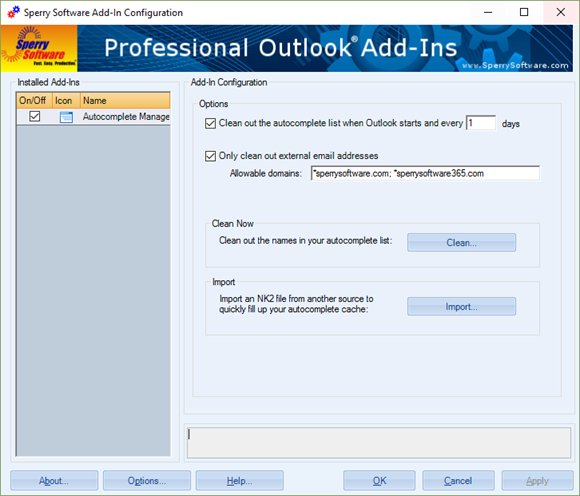
This Outlook Autocomplete Manager add-in will automatically remove people (optionally only those that are external to your organization) from your autocomplete cache once a day (or once a week, or whatever schedule works best for you including immediately with an on-demand Clean Now button). When done, your To field dropdown selections will be limited to just those people in your company.
This Outlook feature is known by several names – autocomplete or autofill, and it used to be known as the nickname cache (complete with an NK2 file!) but regardless of which name you use, you know that unauthorized disclosures in emails occur every day. But you can help stop them by having your autocomplete list cleaned out on a regular basis.
Highlights
- Automatically keeps your auto-complete list clean
- Allows fine grained control over the auto-complete dropdown list
- 2 years of chat, email, and phone support
- 2 years of free upgrades
Features
- Cleans out the nickname cache on a daily basis, or every N days, or immediately on demand
- Optionally only cleans external addresses, leaving all company nicknames intact (so that the autocomplete feature can be left on in the organization)
- Imports NK2 files (but not export)
- Integrates directly into Microsoft Outlook
- Easily enable/disable the add-in
- Works with Office 365, Outlook 2021, 2019, 2016 (both 64-bit and 32-bit)
Add it to your cart by selecting the "Add To Cart" button.
*Click on the images to enlarge.
Download your copy immediately and start feeling more confident about sending email in minutes!
Downloads
14-Day Trial Outlook Downloads
- These versions are for classic desktop Outlook and not "new Outlook" - see How to tell if you are using classic desktop or new Outlook.
- Our trial versions are fully functional and are the production version.
- The version you choose below is dependent on whether you have 32-bit or 64-bit Outlook - see How to tell if you have 32-bit or 64-bit Outlook installed for help.
- If you need to uninstall for any reason, review our instructions for uninstalling our add-ins.
- View our End User License Agreement.
Version: 8.2.9732.32587
Last Updated On: 2026-08-24
For Windows 11, Windows Server 2016 or higher;
And Microsoft 365, Outlook 2024, Outlook 2021, Outlook 2019, and Outlook 2016
Autocomplete Manager for Microsoft 365/Outlook 2024/2021/2019/2016 (32-bit)
Autocomplete Manager for Microsoft 365/Outlook 2024/2021/2019/2016 (64-bit)
Version 8.1:
Version: 8.1.8918.26844
Last Updated On: 2024-06-01
For Windows 10, 11, Windows Server 2016 or higher;
And Office 365, Outlook 2021, Outlook 2019, and Outlook 2016
Autocomplete Manager for Microsoft 365/Office 365/Outlook 2021/2019/2016 (32-bit)
Autocomplete Manager for Microsoft 365/Office 365/Outlook 2021/2019/2016 (64-bit)
All downloadable add-ins:
View the list of all our downloads (in alphabetical order)
Info:
Note that administrators can turn off the autocomplete feature altogether, but Sperry Software customers asked us to produce an add-in that was more selective. So, this add-in clears out the list only when Outlook first starts so that as Outlook is used, some gains in productivity can be realized throughout the day, especially when sending to your most frequent recipients but without the fear that you might send to an unintended recipient.
The ability of the add-in to work on just auto-complete list entries that do not belong to your company domains is a step further in productivity while ensuring safe email correspondence because it will not remove your colleagues from the list.
You can read more on our blog article titled Mitigating Risks of Using the Autofill Feature in Outlook.
Read More from our Blog:
- All New Versions (v8.0) Are Now Released Out of Beta
- Announcing Version 8.0 of Our Desktop Add-Ins
- Dealing With Outlook’s Autocomplete Feature
Buy your copy today and start feeling more confident about the information you send.
Prevent mistakes when sending – this add-in prompts when you send email outside your company, if the email contains certain words or patterns, or even if the attachments violate your conditions. It checks outgoing emails for over 12 different safeguards. Perfect for legal firms, or defense firms with sensitive communications.
Reply all is an email function that streamlines the process of getting fired. If you’re trying to avoid this – this add-in is for you.
