

Attachment Save
Save space in your inbox! Keep your email in Outlook and your attachments in a separate Windows folder with this powerful Save Emails and Attachments add-in. It automatically replaces attachments with a link to the file.
Do you need to save attachments or email to your Windows folders?
The Outlook Attachment Save add-in saves space in your Microsoft® Outlook® inbox (or any other Outlook folder) by removing the file attachments off your email and saving them to a Windows folder as the email arrives. Eliminate tedious hours of labor with customizable rules that allow you to save and remove email attachments from certain people, only when certain subjects are present, only when certain attachment file names are used, or choose to save all attachments.
“Thanks – love the program! I have been looking for months for some way to do this.”
– Pat Ventura
Highlights
- Replaces all attachments with URL links
- Decreases storage space in Outlook
- Allows Outlook to operate more efficiently
- Retains the paperclip icon, but removes the attachment(s)
- Allows for automatic renaming or overwriting of files
- Asks you if you want to delete the attachment if deleting an email - keeps things tidy
- 2 years of chat, email, and phone support
- 2 years of free upgrades
Features
- Saves emails in 5 different formats (MSG, HTML, TXT, EML, or TNEF)
- Saves attachments to a Windows folder as well
- Runs automatically in the background as each email is received or catch up quick with manual/batch mode
- Powerful built in filters to save only the emails or attachments you need, such as older than a certain date
- Monitors multiple Outlook folders for incoming email attachments at the same time
- Replaces attachments with URL links to the saved file for easy access
- Retains the paperclip icon, but removes the attachment
- Automatically removes the URL when replying or forwarding the email
- Asks you if you want to delete the attachment if deleting an email
- Allows for robust and automatic renaming of attachments
- Saves the email or attachments in a Windows sub-folder (mimics the Outlook folder structure)
- Optionally execute a program on the attachment after removing it from the email
- Accepts UNC paths as well as networked mapped drives
- Eases maintenance with a function to update previously written URLs with a new URL
- Multi-folder Undo feature reverses out all changes and puts attachments back in place
- Works with Microsoft® Exchange, but doesn't require it
- Integrates directly into Outlook for easy access
- Works with Office 365, Outlook 2021, 2019, 2016 (both 32-bit and 64-bit)
*Click on the images to enlarge.
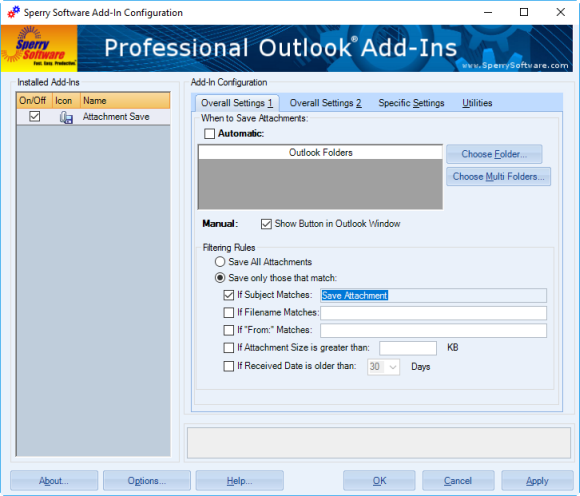
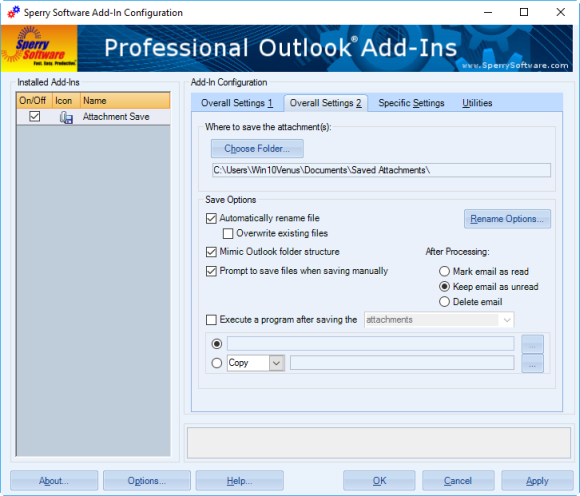
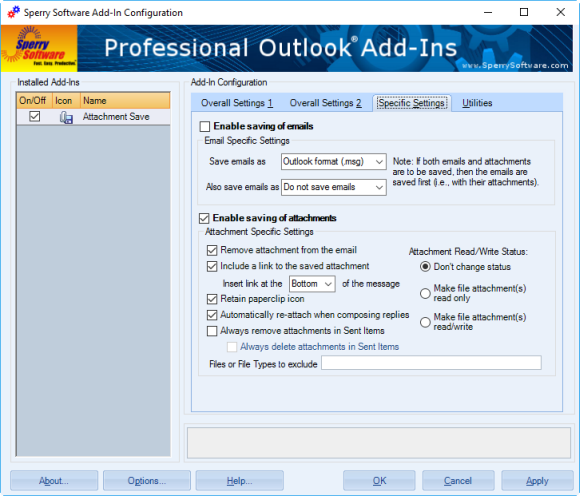
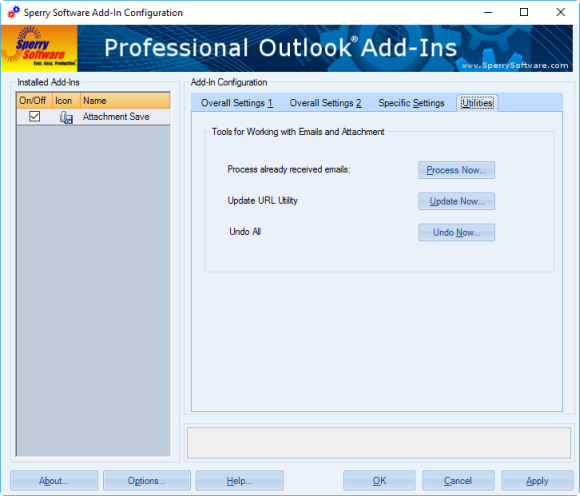
It's a snap to configure the Attachment Save add-in. Here you can see the main add-in screen along with the many powerful options that the add-in supports including the ability to process a whole bunch of emails at once. Buy it today!
"Have used Attachment Save for years. It makes a huge difference in Outlook reliability. My Outlook file is 450 mb, but the directory with all the attachments in it is 3gb. Outlook would never have been able to handle that."
- Phil Davis
Downloads
14-Day Trial Downloads
- Our trial versions are fully functional and are the production version.
- The version you choose below is dependent on whether you have 32-bit or 64-bit Outlook - see How to tell if you have 32-bit or 64-bit Outlook installed for help.
- If you need to uninstall for any reason, review our instructions for uninstalling our add-ins.
- View our End User License Agreement.
Version: 8.1.8937.18970
Last Updated On: 2024-06-20
For Windows 10, 11, Windows Server 2016 or higher;
And Office 365, Outlook 2021, Outlook 2019, and Outlook 2016
Attachment Save for Microsoft 365/Office 365/Outlook 2021/2019/2016 (32-bit)
Attachment Save for Microsoft 365/Office 365/Outlook 2021/2019/2016 (64-bit)
Version 8.0:
Version: 8.0.8831.21940
Last Updated On: 2022-09-27
For Windows 10, 11, Windows Server 2016 or higher;
And Office 365, Outlook 2021, Outlook 2019, and Outlook 2016
Attachment Save for Microsoft 365/Office 365/Outlook 2021/2019/2016 (32-bit)
Attachment Save for Microsoft 365/Office 365/Outlook 2021/2019/2016 (64-bit)
All downloadable add-ins:
View the list of all our downloads (in alphabetical order)
More Information
Also, did you know that you can scan all your previous email messages for attachments, not just new ones that come in? This feature is perfect for your Sent Items folder, where a copy of all the attachments you've ever sent are hanging around taking up valuable space. You can then compact your Outlook PST files, making Outlook operate safely and more efficiently.
Need More Flexibility?
Attachment Save is great because it allows you to save emails and/or attachments to the folder of your choice. But for some users, it's necessary to be able to save emails or attachments from this sender to this folder, and emails (and/or attachments) from that sender to that folder. Attachment Save Pro is one of our newest, most powerful Outlook add-ins and supports this functionality. You can save emails/attachments to different Windows folders based on who it's from, the subject, who it's to, and many other conditions.
Do you need to save emails or attachments in PDF format?
Attachment Save saves emails and/or attachments in Windows native format. However, you might find our Save As PDF more useful because it will save your emails and attachments in PDF format instead.
Need to learn how to save emails and attachments to Windows folders? This article covers the basics for the beginner.
Read More from our Blog:
- All New Versions (v8.0) Are Now Released Out of Beta
- Announcing Version 8.0 of Our Desktop Add-Ins
- Date Display Format Tricks
- Announcing Our Newest Add-In: Attachment Save Pro
- Power Rules Manager (and Other) Bug Fixes
- In Defense of Email…Ten Years Later (Almost)
- A Customer Asks About Printing Invoices…
- Keeping Outlook Running for Long Periods of Time
Human resource departments accepting resumes, business analysts accepting new Excel spreadsheets, accounting departments receiving expense reports... all are already using the Attachment Save add in to increase productivity. Buy your copy today!
Similar to our standard Attachment Save add-in, this add-in will automatically save emails and/or attachments using rules. It will save to different Windows folder locations based on the subject, or who it’s from, etc. Completely versatile with an unlimited number of rules!
Converting emails to PDF files is a breeze with this add-in. It also converts many Microsoft Office file type attachments as well as image attachments and even zip files!
Do you spend a lot of time renaming attachments from fax services or automated scanning systems? Now you can automatically rename attachments (without removing or saving them) when sending or receiving emails.
