

Schedule Recurring Email
Do you need to send recurring email? This add-in allows you to schedule an automatic, repetitive email that will go out at intervals that you define.
Eliminate tedious repetitive email chores…use our email scheduler to send an automatic email that will go out at intervals that you define, for instance daily, weekly, or once a month. Perfect for sending reminder email about upcoming weekly, monthly or quarterly meetings, client billing or payment reminders, or anything that requires that an email go out on a regular basis.
You can also send individual files or send an entire folder. When the email gets sent, all files in that folder at the time of the sending are selected as attachments and sent to whatever email address you specify. Unlike using Microsoft® Outlook® templates which grab the attachment at the time the email template is created, this Schedule Recurring Email add-in grabs the attachment at the time the email is sent so that if changes are occurring on a regular basis, the most recent copies will be picked up and delivered. This feature is useful if you don’t know the name of the files that you need to send ahead of time.
For instance, one customer worked in a 911 call center. A brief description of each 911 call was written up and placed into a folder that was picked up once a week by our add-in, and sent to the local newspaper reporters. The email scheduler saved time by allowing the 911 operator to simply update a single file!
“I was looking for reoccurring email software and came across Sperry Software, so far it has been everything and more of what I needed. I highly recommend this product and will order additional software as needed.”
– Joseph Rauch
Highlights
- Email scheduler sends automatic emails on a regular basis
- Send the message at daily, weekly, monthly or yearly intervals
- Allows attaching files or even entire folders
- New! Schedule hourly emails
- 2 years of chat, email, and phone support
- 2 years of free upgrades
Features
- Sends the message at daily, weekly, monthly, yearly, random or hourly intervals
- New! Now you can add hourly emails to the schedule!
- Address the email to one person or to multiple recipients
- Continue to send the messages until a certain date, 'x' number of times, or have no end date at all
- New! Schedule emails to go out on the first (or last) day/weekday/weekend day of the month
- Attach a file to the outgoing email
- Even attach a folder to the outgoing email
- Send the emails from non-default accounts
- View the entire list of pending emails at a glance
- Backup/Restore the entire schedule (including the emails) to easily transfer the schedule to a new computer
- Integrates directly into Outlook for easy access
- Works with Office 365, Outlook 2021, 2019, 2016 (both 64-bit and 32-bit)
The monthly and yearly patterns can now be adjusted by a number of days so that schedules like “2nd to last workday of the year” or “3 days after the first Tuesday of every month” can be easily specified.
Also: Are you looking to send out newsletters or other marketing to your customers? The Send Individually add-in for Outlook will take a list of people and send the same email to them, one at a time.
"Great little program. Very impressed. Will be ordering it when the demo expires. Thanks!"
- Jim Becher, MicroAge Networks
*Click on the images to enlarge.
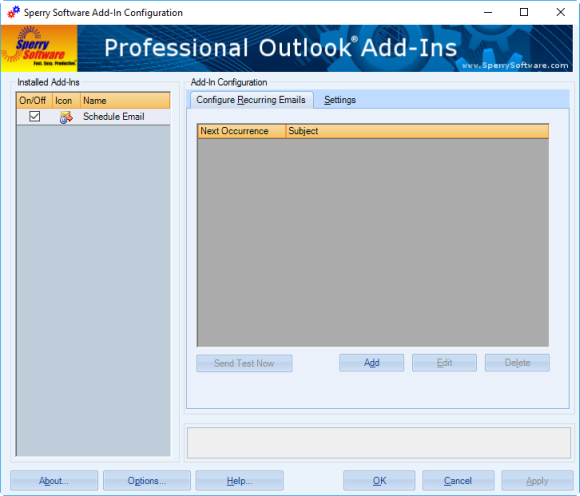
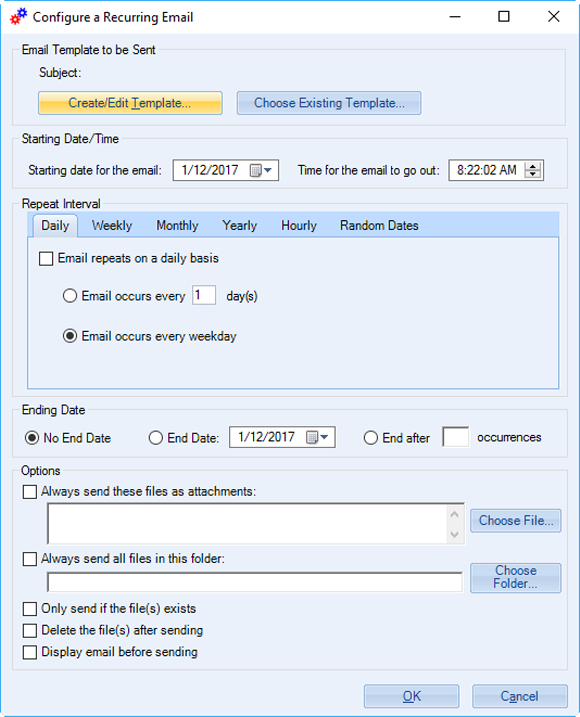

Here you can see several emails that are already scheduled, along with the available options for scheduling a new email to go out. This dependable add-in works behind the scenes to send out the emails on time, every time.
"You guys have the best add-ins ever! Always work like they're supposed to."
- Barry Wright
14-Day Trial Downloads
- Our trial versions are fully functional and are the production version.
- The version you choose below is dependent on whether you have 32-bit or 64-bit Outlook - see How to tell if you have 32-bit or 64-bit Outlook installed for help.
- If you need to uninstall for any reason, review our instructions for uninstalling our add-ins.
- View our End User License Agreement.
Version: 8.1.8918.27121
Last Updated On: 2024-06-01
For Windows 10, 11, Windows Server 2016 or higher;
And Office 365, Outlook 2021, Outlook 2019, and Outlook 2016
Schedule Recurring Email for Microsoft 365/Office 365/Outlook 2021/2019/2016 (32-bit)
Schedule Recurring Email for Microsoft 365/Office 365/Outlook 2021/2019/2016 (64-bit)
Version 8.0:
Version: 8.0.8831.22747
Last Updated On: 2022-10-05
For Windows 10, 11, Windows Server 2016 or higher;
And Office 365, Outlook 2021, Outlook 2019, and Outlook 2016
Schedule Recurring Email for Microsoft 365/Office 365/Outlook 2021/2019/2016 (32-bit)
Schedule Recurring Email for Microsoft 365/Office 365/Outlook 2021/2019/2016 (64-bit)
All downloadable add-ins:
View the list of all our downloads (in alphabetical order)
"Very easy, and appears to be an excellent solution to the problem of reading e-mail on a VHD monitor."
- Art Buck, CA, United States
More Information
Read More from Our Blog:
- 3 Ways Customers Use Schedule Recurring Email for Office 365 to Save Time and Increase Productivity
- All New Versions (v8.0) Are Now Released Out of Beta
- Announcing Version 8.0 of Our Desktop Add-Ins
- Jenny’s Issue
- 2021 Road Map
- Schedule Recurring Email for Outlook 2016 Is Now Released
- Schedule Recurring Email Add-In
- Monthly Fixes and Features
- New Version of Schedule Recurring Email (and Monthly Fixes)
- Schedule Recurring Email with our Add-In
Use our new Schedule Recurring Email Pro add-in to create, schedule and personalize your emails! It’s like our standard Schedule Recurring Email add-in but this version allows you to send personalized emails that go to your recipients one at a time according to your desired schedule.
Do you need to send out emails on a recurring basis? If so, this product is for you. It works similar to our desktop Schedule Recurring Email Add-In for Outlook except that it sends out the emails from our cloud server using your Office 365 account.
The Timed Email Organizer add-in keeps your Inbox neat and tidy by organizing emails using rules. These rules aren’t associated with Outlook rules, and you can even test out your rules before implementing them.
Send out your newsletters, press releases and other announcements to individual recipients. Individually addressing emails allows your email to make it through more spam filters and raises response rates.