

Reply To All Monitor
Reply all is an email function that streamlines the process of getting fired. If you’re trying to avoid this – this add-in is for you.
What would happen if someone in your firm clicks the reply to all button with the wrong people addressed? For most places, it’s an embarrassment, but for some corporations, especially law firms, it’s a potential liability.
Don’t wait until it’s too late; Just ask the system administrators at the US State Department.
Reply To All Monitor helps to stop these disasters by warning users that they are about to reply to everyone. This simple check is enough to prevent the majority of errors.
New! This product’s features have all been incorporated into both Safeguard Send for Microsoft 365 and Safeguard Send Core, in case you are using the newest version of Outlook or need it to work in Outlook on the Web! The version below is for classic Outlook on desktop Windows only.
The Outlook Reply to All Monitor add-in has four built in checks:
- …prompts when a reply to all is going to occur (shown below)
- …removes your own name from the list of recipients
- …prompts when it looks like you were BCC’ed on the message
- …prompts when you click the “Reply” instead of the “Reply To All” button and there is more than one recipient
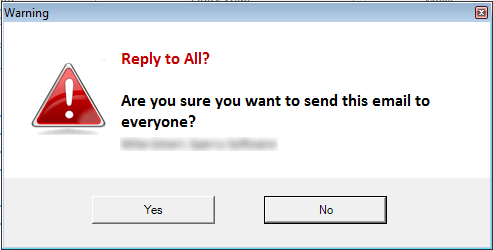
The Outlook Reply to All Monitor add-in also now has the ability to warn only when there are external recipients (those outside your company), allowing users a chance to catch important information before it heads out the door. This is important for all firms, and critical for some, especially law firms. That’s why Sperry Software’s Reply To All Monitor is now in 16% of the top 350 law firms in the United States, because they recognize the importance of preventing mistakes before they happen.
Highlights
- Prompts you when you are going to reply to everyone - preventing you from sending out potentially confidential information you may not want to share
- Saves time by preventing Outlook from including your name and email address in a reply to all message
- Prompts you before sending with a confirmation message if you were BCC'ed on the message to prevent you from inadvertently "spilling the beans" that you were BCC'ed on that message
- Optional "lock down mode" to prevent changes (for volume/corporate customers only)
- 2 years of chat, email, and phone support
- 2 years of free upgrades
Features
- Prompts when a reply to all is going to occur, to prevent replies going out to everyone in a large distribution list, and to prevent confidential or embarrassing information from going to the wrong people
- Optionally only prompts when a reply to all is destined to go outside your company domains
- Removes your own name and address from the list of recipients, to save time
- Prompts you when it looks like you were BCC'ed on the message, so that you don't inadvertently reveal that you were the recipient of the blind carbon copied (BCC) message
- Prompts when the "Reply" is clicked (instead of the "Reply To All") and there is more than one recipient - to keep everyone in the loop the first time around
- Allows the text of each prompt to be customized, including individually listing the recipients
- Independently control each of these features
- Works with, but does not require, Microsoft® Exchange Server
- Integrates directly into Microsoft® Outlook® for easy access
- Works with Office 365, Outlook 2021, 2019, 2016 (both 64-bit and 32-bit)
All of these features are individually controlled, so that you can just use one or the other independently. And like all the Sperry Software add-ins, they work with Microsoft Exchange but don't require it, requiring just Microsoft Outlook 2007 or higher.
Need more proof? Read these stories from Fortune of people who could have benefited from this add-in.
*Click on the images to enlarge.
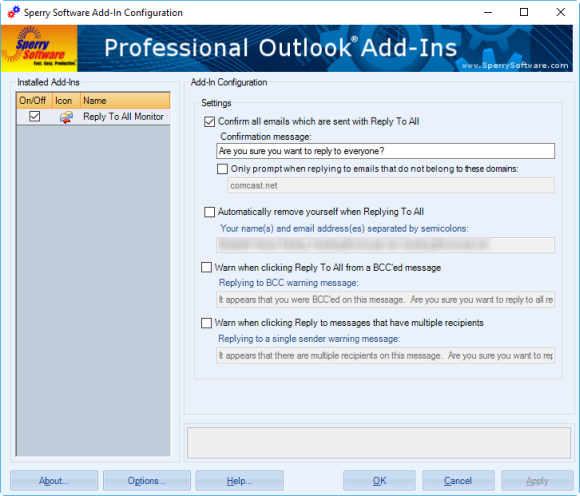
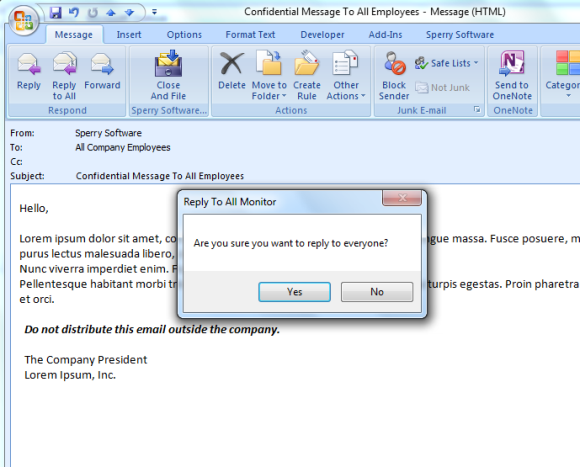
Here you can see the configuration options (above) and the warning prompt that shows up when the reply to all button is clicked.
Downloads
14-Day Trial Outlook Downloads\r
- \r
\t
- These versions are for classic desktop Outlook and not "new Outlook" - see How to tell if you are using classic desktop or new Outlook. \r \t
- Our trial versions are fully functional and are the production version. \r \t
- The version you choose below is dependent on whether you have 32-bit or 64-bit Outlook - see How to tell if you have 32-bit or 64-bit Outlook installed for help. \r \t
- If you need to uninstall for any reason, review our instructions for uninstalling our add-ins. \r \t
- View our End User License Agreement. \r
\r Version: 8.2.9687.13533
Last Updated On: 2026-07-10
\r For Windows 11, Windows Server 2016 or higher;
\r And Microsoft 365, Outlook 2024, Outlook 2021, Outlook 2019, and Outlook 2016
\r Reply To All Monitor for Microsoft 365/Outlook 2024/2021/2019/2016 (32-bit)
\r Reply To All Monitor for Microsoft 365/Outlook 2024/2021/2019/2016 (64-bit)\r
\r \r Version 8.1:
\r Version: 8.1.9074.16338
Last Updated On: 2025-01-13
\r For Windows 10, 11, Windows Server 2016 or higher;
\r And Office 365, Outlook 2021, Outlook 2019, and Outlook 2016
\r Reply To All Monitor for Microsoft 365/Office 365/Outlook 2021/2019/2016 (32-bit)
\r Reply To All Monitor for Microsoft 365/Office 365/Outlook 2021/2019/2016 (64-bit) \r
\r All downloadable add-ins:\r
\r \r View the list of all our downloads (in alphabetical order)
Corporate customers - Sperry Software offers significant volume discounts and custom builds for those firms interested in purchasing volume licenses.
Do you need to prevent information from leaving your corporate domains via email when you send as well? If so, be sure to check out Safeguard Send Add-In for Outlook. It will prompt you when you are composing or replying to certain people, sending an email to too many people, sending an email that is destined to go outside the company domains, plus other safeguard measures to keep your email from being read by anyone except who it was meant for.
Read More:
White Papers and Press
Our white papers show why having a solution like ours helps not only to avoid potential liabilities but also "internal spam" (where employees mistakenly click reply to all and everyone in the company sees the reply) which wastes time and takes up disk space on email servers.
Prevent mistakes when sending – this add-in prompts when you send email outside your company, if the email contains certain words or patterns, or even if the attachments violate your conditions. It checks outgoing emails for over 12 different safeguards. Perfect for legal firms, or defense firms with sensitive communications.
Prevent mistakes when using tab to select email addresses in the To field by clearing out your autocomplete list on a regular basis. This add-in will do just that – every time you start Outlook it will clean out the “To” field drop down list.
Are you worried about your users carelessly sending emails to the wrong people? Is letting users respond to phishing emails or perhaps classified information spills a concern for you? This Outlook add-in helps you avoid these mistakes and provides an external email warning whenever sending an email outside your company.
