

Power Rules Manager
Sort, print and edit your Outlook rules right from a convenient, easy to read grid. Includes four validation checks including finding duplicate rules.
Do you have broken rules and feel limited by the Outlook rules manager? The Power Rules Manager add-in for Microsoft® Outlook® simplifies managing your Outlook rules. Your rules will be shown in a clear and simple grid so you can take control of your rules.
The add-in is effectively an Outlook rules editor, plus it allows you to quickly find specific rules, sort the rules alphabetically (or by the folder, or any other grid column header), and you can import/export rules.
The add-in also helps you to save space in your Outlook rules by making it easy to consolidate your rules. Not only does it have the ability to sort your rules by the folders involved so you can quickly see which rules are similar, but you can now simply click the “Consolidate Rules” button to have rules that have identical actions merged into a single rule! Merging Outlook rules saves a lot of space. For instance, if you know that you have three rules that move messages into a particular folder, but based on different conditions, then those three rules can be coalesced into a single rule with all three conditions.
By the way, if you’re having issues with Outlook rules be sure to check out our Timed Email Organizer add-in. It also has rules but they cannot run out of space. You can compare the two add-ins here.
“Looking forward to full control over my Outlook Rules monster! Many duplicate rules quickly detected and erased, re-ordered, etc. Thanks Sperry!”
– Geoff Sale, BC, Canada
Highlights
- Sort your Outlook rules alphabetically
- Print Outlook rules
- Easily fix your rules
- Save space in your Outlook rules
- Manage your rules from a terrific grid view
- 2 years of chat, email, and phone support
- 2 years of free upgrades
Features
- Adds a toolbar button directly into Outlook for easy access to your rules
- Easily sort Outlook rules by name, what order they run, by the folders involved in the rule, by the people involved in the rule, and more
- Set Execution Order feature allows you to easily set the execution order of all your rules at once
- Print your Outlook rules
- Easily edit rules inline in the grid
- Find/Find Next feature allows you to quickly hone in on the rules that matter most to you
- Backup and Restore your rules (to an editable XML file)
- Bulk replace folders to all your rules at once
- Fix rules with the Validate Folders and People button
- Save space in your Outlook rules with the Consolidate Rules and the Find and Repair Duplicate Rules button
- Easily execute selected (or all) Outlook rules against folders you select
- Works with Microsoft Exchange Server
- Works with Office 365, Outlook 2021, 2019, 2016 (64-bit and 32-bit)
There are five validation checks built into the add-in. You can flag duplicate rule names, find and repair duplicate rules, validate and automatically correct missing Stop actions, verify folders and contacts involved in each rule, and consolidate/merge your rules. Each of these checks has their own button so you can invoke them separately to check Outlook rule consistency at any time. The Validate Stop Actions feature alone is worth the price of the add-in because it will flag all the rules that have a move action but no corresponding stop processing more rules action. Not having a stop processing more rules action is a primary reason for getting duplicate emails.
"I have nearly 900 Outlook rules that I use every day (obviously not through an Exchange Server!). This was a nightmare to manage using Outlook alone. Power Rules Manager turned my Outlook rules nightmare into a dream. I really appreciate this product! Sperry Software and Power Rules Manager deserve a 5 star rating all around!"
- Gary D. Collier, IN, United States
Screenshots
*Click on the images to enlarge.
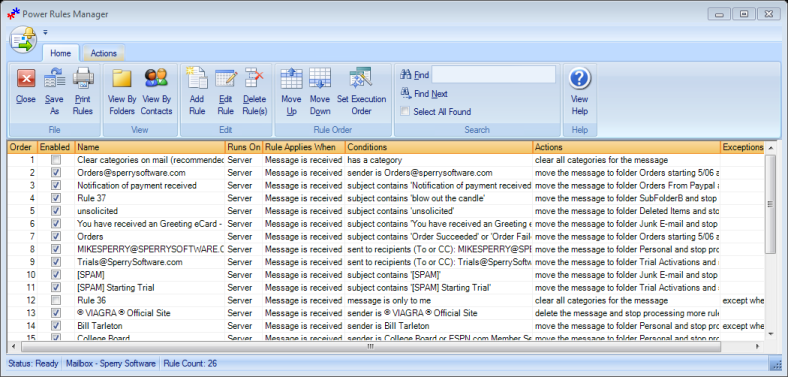
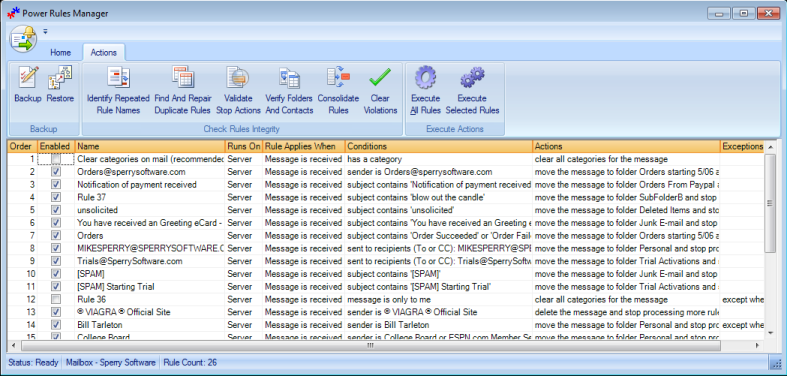
The add-in works with your existing Outlook rules and makes it easy to sort, print and edit your rules. Download your copy today!
"Great Outlook e-mail rules manager. Effective cleanup and organization tool. Easily edit and amalgamate rules, and easily view and reorder them in a re-sizeable window you can actually use."
- Aaron from Alberta, Canada
Downloads
14-Day Trial Outlook Downloads\r
- \r
\t
- These versions are for classic desktop Outlook and not "new Outlook" - see How to tell if you are using classic desktop or new Outlook. \r \t
- Our trial versions are fully functional and are the production version. \r \t
- The version you choose below is dependent on whether you have 32-bit or 64-bit Outlook - see How to tell if you have 32-bit or 64-bit Outlook installed for help. \r \t
- If you need to uninstall for any reason, review our instructions for uninstalling our add-ins. \r \t
- View our End User License Agreement. \r
\r Version: 8.2.9730.28628
Last Updated On: 2026-08-22
\r For Windows 11, Windows Server 2016 or higher;
\r And Microsoft 365, Outlook 2024, Outlook 2021, Outlook 2019, and Outlook 2016
\r Power Rules Manager for Microsoft 365/Outlook 2024/2021/2019/2016 (32-bit)
\r Power Rules Manager for Microsoft 365/Outlook 2024/2021/2019/2016 (64-bit)\r
\r \r Version 8.1:
\r Version: 8.1.8918.27008
Last Updated On: 2024-06-01
\r For Windows 10, 11, Windows Server 2016 or higher;
\r And Office 365, Outlook 2021, Outlook 2019, and Outlook 2016
\r Power Rules Manager for Microsoft 365/Office 365/Outlook 2021/2019/2016 (32-bit)
\r Power Rules Manager for Microsoft 365/Office 365/Outlook 2021/2019/2016 (64-bit) \r
\r All downloadable add-ins:\r
\r \r View the list of all our downloads (in alphabetical order)
"My use of the trials of Power Rules Manager and Add Email Address were successful, and that's why I'm buying them. Power Rules Manager solved a problem I had with a rule that became corrupted and was moving all incoming messages from 20 email addresses into one folder. It couldn't be found with Outlook 2016 Manage Rules. Power Rules Manager fixed that problem in just a few seconds."
- Ronald Ogg from CA, United States
Tip: How to save space in Outlook rules
Outlook rules sometime run out of space. To fix this, follow these 8 simple tips to save space in Outlook rules.
Tip: How to import Outlook rules
Are you having trouble importing your rules, or trying to fix your rules after a botched import attempt? If so, read this article: How to import Outlook rules (and fix problems along the way).
Tip: How to use Outlook rules (A beginner's guide)
Here's a great guide to getting started with Outlook rules, and covers everything from "What can I do with Outlook rules" to a few esoteric questions like "Are rules case sensitive?".
Read More from Our Blog:
- Announcing Version 8.2 of All Desktop Outlook Add-ins
- All New Versions (v8.0) Are Now Released Out of Beta
- Announcing Version 8.0 of Our Desktop Add-Ins
- Updates: Save As PDF Pro, Power Rules Manager, and Pricing Changes
- Tips to Improve Working From Home
- How to Use Outlook Rules (A Beginner’s Guide)
- Power Rules Manager (and Other) Bug Fixes
- Monthly Fixes and Features
- Power Rules Manager for Outlook 2013
- Weekly Fixes for 8/26/2013
The Timed Email Organizer add-in keeps your Inbox neat and tidy by organizing emails using rules. These rules aren’t associated with Outlook rules, and you can even test out your rules before implementing them.
