

Auto Print
Finally, an add-in that automatically prints email when it arrives at your Inbox without you having to do anything. Save time by automating those repetitive chores.
Easily auto print your most important Microsoft® Outlook® email messages with the Auto Print add-in. Perfect for automatically printing invoices, orders, or anything you receive in email just turn on your printer and go. It will even allow you to print just the emails, just the attachments, or both!
This add-in saves time since it’s automated. It stops you or others in your organization from having to waste time printing manually, especially if more than one copy of an attachment has to be printed. Plus, it prevents mistakes such as forgetting to print emails or attachments.
It can print emails or attachments as they come in or all the emails in a particular folder, all at once (i.e., batch mode), and it prints them in order.
“I spent about $600 trying to do what your program does, and still I couldn’t get done what I needed. Your software did just what I needed; simply print emails and attachments together. You have a knack for finding annoying missing capabilities and solving them. I plan to buy that software and others.”
– David
Highlights
- Automatically print emails and/or attachments
- Works on incoming or outgoing email and/or attachments
- "Print Now" facility for one click batch printing of entire folders
- Built-in filter to print just certain attachment types (like PDF invoices or orders)
- Print to any printer, not just the default
- 2 years of chat, email, and phone support
- 2 years of free upgrades
Features
- Prints just the email, just the attachment, or both
- Prints email that arrives at your inbox or any other Outlook folder
- Works on outgoing email as well
- Easily handles PDFs, Word docs, Excel files, and many more file types
- Powerful filters allow you to print email containing certain subjects only or from certain senders only
- Works with Office 365, Outlook 2021, 2019, 2016 (both 32-bit and 64-bit)
- Integrates directly into Outlook for easy access
- Easily enable/disable the add-in to turn it on or off when you need it
- Print emails and/or attachments to any printer, not just the default
- Control margins, number of copies, collate and all the other printer options you'd expect
- Batch printing capability allows printing of emails and/or attachments in one or multiple folders
- Batch printing can also be filtered by the built-in filters for fine grained control over what prints out
- Cancel out of the batch print at any time
- Optionally prints the number of attachments in the email
- Ability to optionally delay between prints means that the emails and attachments print in order (i.e., one email, then its attachments, next email, etc.)
- Prints the title and the name of attachments in addition to the email itself
- New! Accepts a list of files to never print - perfect for legal disclaimers
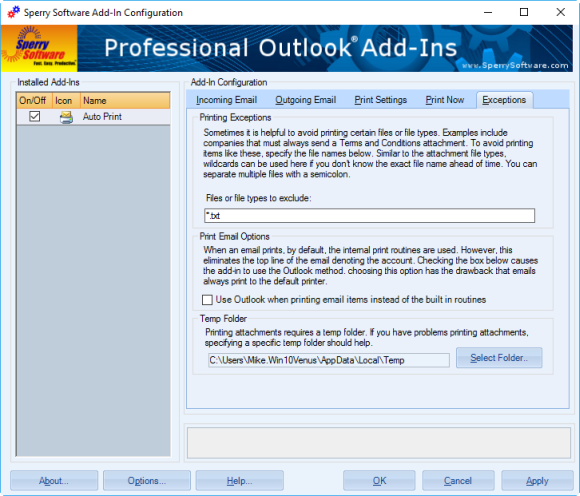
A new feature recently added now allows you to specify a list of files (including wildcards) that the add-in will not print. This is useful if you continuously receive say, a terms and conditions document or a legal disclaimer attachment and you don't want to print those items.
Because it also works on outgoing email, you can easily create a log of all your sent items. Add it to your cart by selecting the "Add To Cart" button above.
"Excellent service and love the software. Saves time printing pdf invoices I receive from my vendors."
- Randy W
*Click on the images to enlarge.
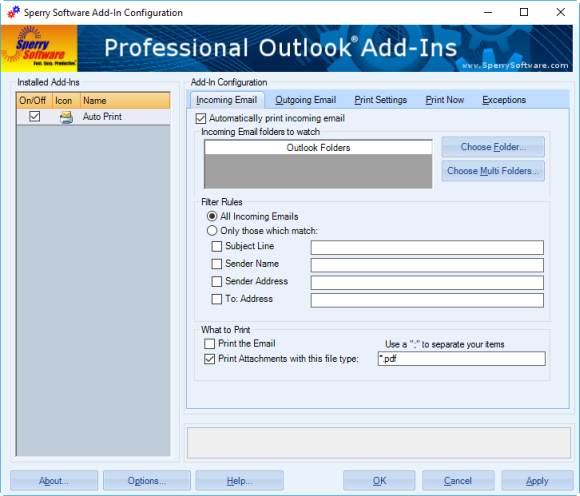
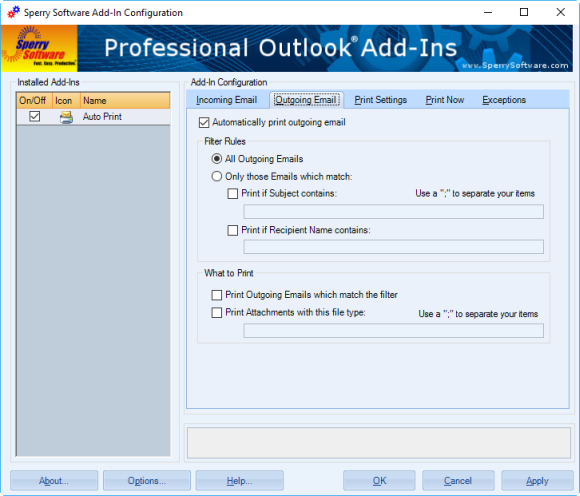
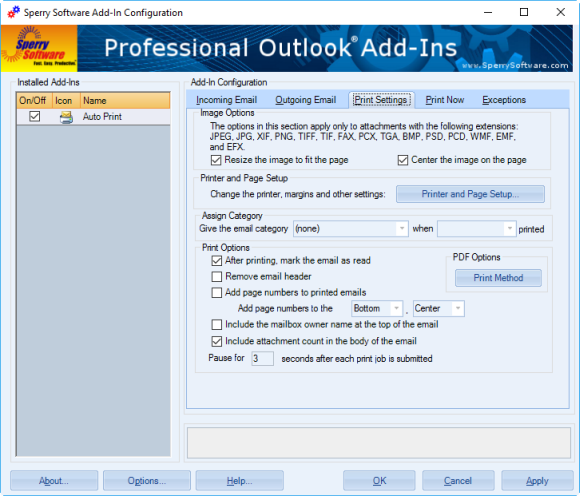
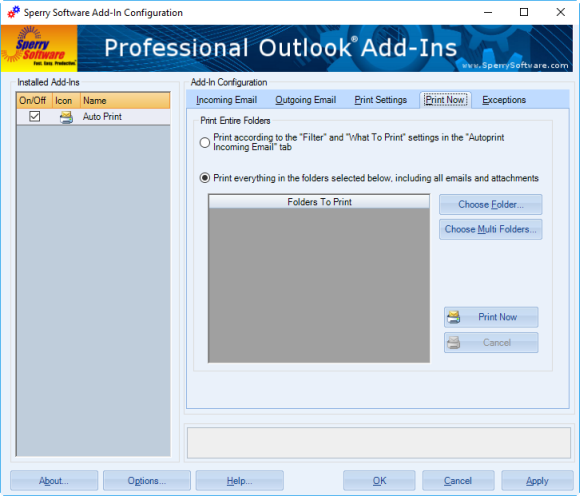
 Automatically print emails or just their attachments with ease. Selectively filter which emails get printed, based on subject, sender or attachment name. Or, just print them all. Perfect for automatically printing warehouse orders, faxes, or whatever you need to have printed!
"Sperry Software's Auto Print appears to be a high-quality, low-cost solution to our printing needs."
- R. Jason Klein, United States
Automatically print emails or just their attachments with ease. Selectively filter which emails get printed, based on subject, sender or attachment name. Or, just print them all. Perfect for automatically printing warehouse orders, faxes, or whatever you need to have printed!
"Sperry Software's Auto Print appears to be a high-quality, low-cost solution to our printing needs."
- R. Jason Klein, United States
Downloads
14-Day Trial Downloads
- Our trial versions are fully functional and are the production version.
- The version you choose below is dependent on whether you have 32-bit or 64-bit Outlook - see How to tell if you have 32-bit or 64-bit Outlook installed for help.
- If you need to uninstall for any reason, review our instructions for uninstalling our add-ins.
- View our End User License Agreement.
Version: 8.1.8918.26485
Last Updated On: 2025-04-10
For Windows 10, 11, Windows Server 2016 or higher;
And Office 365, Outlook 2021, Outlook 2019, and Outlook 2016
Auto Print for Microsoft 365/Office 365/Outlook 2021/2019/2016 (32-bit)
Auto Print for Microsoft 365/Office 365/Outlook 2021/2019/2016 (64-bit)
Version 8.0:
Version: 8.0.8831.21940
Last Updated On: 2024-04-20
For Windows 10, 11, Windows Server 2016 or higher;
And Office 365, Outlook 2021, Outlook 2019, and Outlook 2016
Auto Print for Microsoft 365/Office 365/Outlook 2021/2019/2016 (32-bit)
Auto Print for Microsoft 365/Office 365/Outlook 2021/2019/2016 (64-bit)
All downloadable add-ins:
View the list of all our downloads (in alphabetical order)
"Excellent product. Easy to use. Made printing thousands of emails possible."
- Mary Jo Gremling, IN, United States
More Information
Important: Are you trying to print to PDF? If you plan on using this add-in in conjunction with a PDF printer driver with the ultimate end being to create a PDF file of your emails and attachments, then you might want to take a look at our new Save As PDF Outlook add-in. This add-in will save your emails and/or attachments directly to PDF format without the need for a PDF printer driver. While the Auto Print add-in will do what you're looking for, it just might be simpler to use the Save As PDF add-in. Note: Do you need to print to different printers based on who the email is from, or based on the subject or contents of the email body? If so, see our Auto Print Pro add-in for Outlook or compare the features between the two add-ins. More printing information: And just in case, here is an article on how to print emails and/or attachments in Outlook (both with and without the help of add-ins). Read more from our blog:
- Important Security Updates for Several Add-Ins
- All New Versions (v8.0) Are Now Released Out of Beta
- A Recent Microsoft Update Breaks Some Add-Ins
- Announcing Version 8.0 of Our Desktop Add-Ins
- New 7.1 Versions – Fixed Bugs
- Microsoft Word Security Notice – Fixed
- Power Rules Manager (and Other) Bug Fixes
- Important Recent Bug Fixes to Several Add-Ins
- How to Print Only the First Page of an Outlook Email
- In Defense of Email…Ten Years Later (Almost)
This add-in installs three new Outlook toolbar buttons that allow you to 1) print the email and 2) print the attachment(s) or 3) print both.
Converting emails to PDF files is a breeze with this add-in. It also converts many Microsoft Office file type attachments as well as image attachments and even zip files!
Similar to our standard Auto Print add-in, this add-in will automatically print emails and/or attachments using rules. It will even print to different printers based on the subject, or who it’s from, etc. Completely versatile with an unlimited number of rules!
Everything our standard Save As PDF add-in does plus it uses rules to save Outlook email as PDF. It even converts multiple emails to a single PDF file (known as a Portfolio) so that it goes email 1, attachments, email 2, attachments, etc.