

This month we want to make you aware that Auto Print, Auto Print Pro, Print On Demand, Save As PDF, and Save As PDF Pro all received a security update.
It is important that you upgrade at your earliest opportunity.
To this end, remember that about two years ago we have implemented the ability to automatically update your add-ins, so you can follow those instructions. Just in case, here’s a four step graphic showing you how to do it:
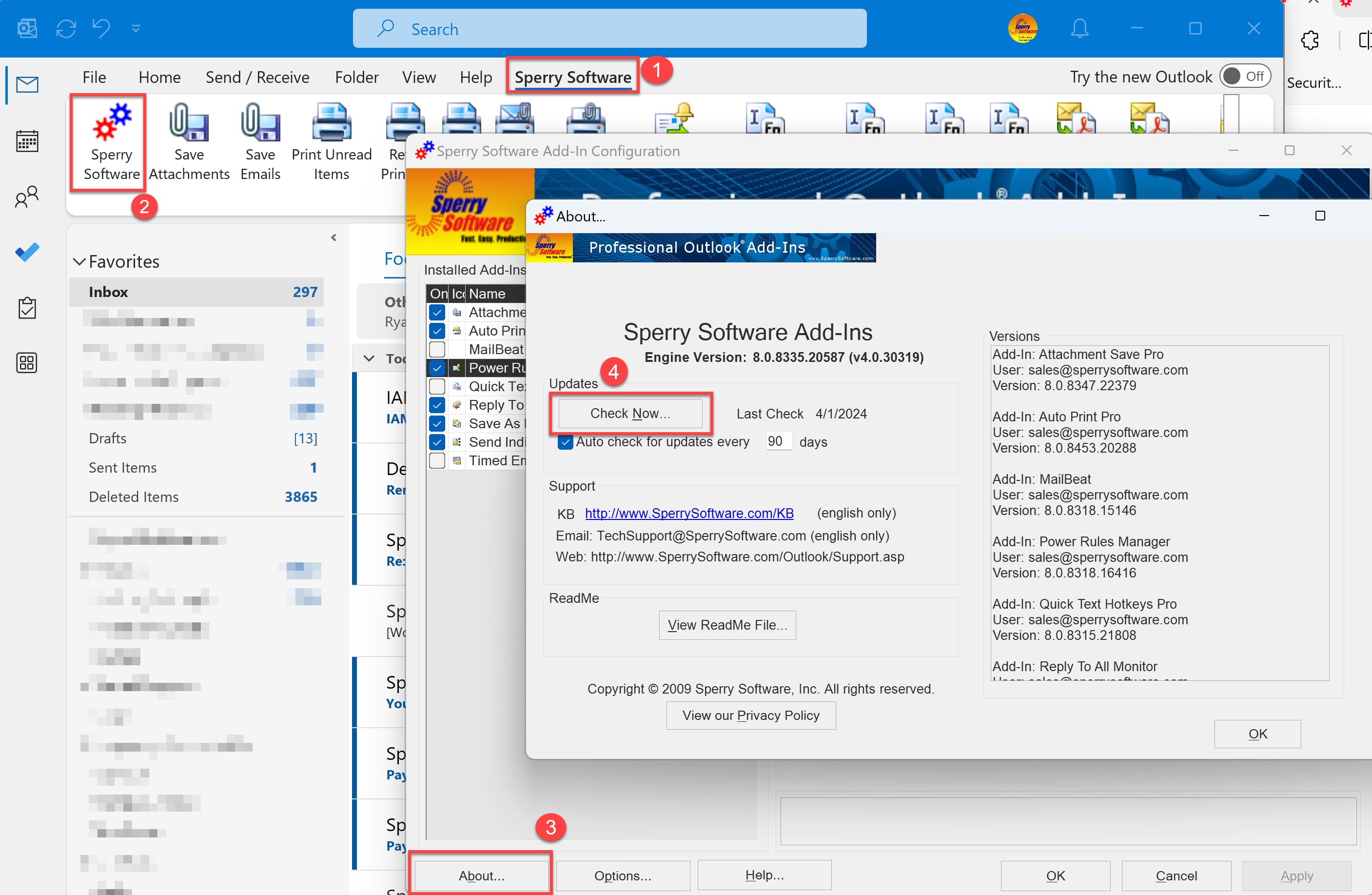
The security updates a 3rd party component that we use internally. You’ll know that you are using the most recent version (with the security hole patched) because your version shown in the About window will match the ones on the What’s New page.

Related Posts

Comments (6)
Comments are closed.

I was unable to install the updated software. I followed the instructions but an error message appeared saying the installer address was incorrect
As mentioned above, if the instructions didn’t work, you’ll have to upgrade manually by performing a clean reinstall. This starts you over from ground zero, so you might want to take a few screenshots of your settings. This process will not erase your license.
i couldn’t update as instructed because couldn’t see Sperry software updates on page. i tried to click on new outlook and it went a few steps and froze up. Please advise how to install these updates or call me at 813-516-6328
If the instructions didn’t work, you’ll have to upgrade manually by performing a clean reinstall. This starts you over from ground zero, so you might want to take a few screenshots of your settings. This process will not erase your license.
Will the individual email sender be available for the new outlook.
Yes, we are working on getting it into Microsoft AppSource. It is currently only available on Microsoft Azure Marketplace, where it can only be installed by your administrator (of you, if you are an administrator). See our Guide to Deploying Send Individually for more information about this.